


So how can we backup the config of our ESXi hosts? There is a great command you can use in vSphere CLI “vicfg-cfgbackup.pl”, which when used with certain switches can either back up or restore your ESXi host config.
Backing up a host#
Quite simply you fire up your vSphere CLI client and run the command as shown below, make sure you define a file name as well as the destination folder or it will error.

You will then be prompted for authentication to the host, assuming you input the correct credentials the firmware configuration will be saved successfully to the folder you specified.

You may notice on my example I saved the file type as .tgz, you can drill into the .tgz file and see all of the config this process saves which is kind of handy if you want to be doubly sure it did the job correctly.
Restoring a host#
So now you want to restore a host from a backup you have taken, we can use the same command but with the -l switch.

Important things to note
- This action will reboot your host
- This command will want to place your host in maintenance mode so therefore you will need to evacuate any VMs on the host.
- Placing the host into maintenance mode prior to running the command will not work and it will error, the process needs to place the host in maintenance mode itself.
- If you are running a small cluster you will likely need to disable HA while you perform this action to avoid errors being generated due to the lack of available resources.
Example error below
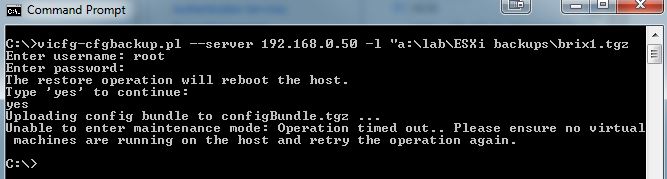
Successful restore below

I have found this to be really handy if I wish to restore a host to a previous running config, and by example will save you having to re-enter all of your network config etc.