

This was a fun little error, whilst installing the distributed IaaS roles I couldn’t seem to get the IaaS components to install – when I got the Website and Model Manager Data install it would fail with the following message:
##InitializeRepo Registering solution user in the VA, initializing Repository MetaModel and Authorization
"C:\Program Files (x86)\VMware\vCAC\Server\Model Manager Data\Cafe\Vcac-Config.exe" RegisterSolutionUser -url https://vcloud.definit.local --Tenant "vsphere.local" -cu "[email protected]" -cp ******  --FileName "C:\Program Files (x86)\VMware\vCAC\Server\Model Manager Data\Cafe\Vcac-Config.data" -v
    VMware.Cafe.HtmlResponseException: Internal Server Error (500)
    at VMware.Cafe.JsonRestClient.<HandleErrorResponse>d__8d`1.MoveNext()
  --- End of stack trace from previous location where exception was thrown ---
     at System.Runtime.CompilerServices.TaskAwaiter.ThrowForNonSuccess(Task task)
     at System.Runtime.CompilerServices.TaskAwaiter.HandleNonSuccessAndDebuggerNotification(Task task)
     at VMware.Cafe.JsonRestClient.<CreateResource>d__2d`1.MoveNext()
  --- End of stack trace from previous location where exception was thrown ---
     at System.Runtime.CompilerServices.TaskAwaiter.ThrowForNonSuccess(Task task)
     at System.Runtime.CompilerServices.TaskAwaiter.HandleNonSuccessAndDebuggerNotification(Task task)
     at VMware.Cafe.ComponentRegistryClient.<CreateSolutionUserAsync>d__5.MoveNext()
  Http response:
  StatusCode: 500, ReasonPhrase: 'Internal Server Error', Version: 1.1, Content: System.Net.Http.StreamContent, Headers:
  {
    Vary: Accept-Encoding
    Vary: User-Agent
    Connection: close
    Date: Thu, 10 Jul 2014 23:20:43 GMT
    Content-Length: 3784
    Content-Type: text/html; charset=utf-8
  }
  Warning: Non-zero return code. Command failed.
C:\Program Files (x86)\VMware\vCAC\Server\Model Manager Data\DeployRepository.xml(556,5): error MSB3073: The command ""C:\Program Files (x86)\VMware\vCAC\Server\Model Manager Data\Cafe\Vcac-Config.exe" RegisterSolutionUser -url https://vcloud.definit.local --Tenant "vsphere.local" -cu "[email protected]" -cp ******  --FileName "C:\Program Files (x86)\VMware\vCAC\Server\Model Manager Data\Cafe\Vcac-Config.data" -v" exited with code 1.
Done Building Project "C:\Program Files (x86)\VMware\vCAC\Server\Model Manager Data\DeployRepository.xml" (InitializeRepo target(s)) -- FAILED.
Build FAILED.
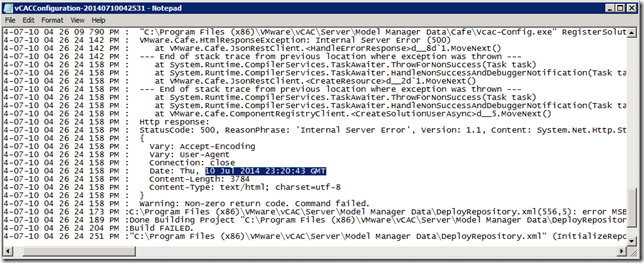
I’ve pasted it in here because I couldn’t find anything through google that referred to my error messages – hopefully if you’re reading this you’ve found it because you’re looking for it!
I tried all sorts of things before noticing the HTTP header – specifically the Date – which showed an incorrect time. I jumped on the VCAC appliances via SSH and checked the time using “date”. One of my appliances was indeed out of skew - somehow the NTP service had been stopped after I configured it previously.
I edited the ntp.conf (vi /etc/ntp.conf) and checked I had entries in there – e.g. “server 0.uk.pool.ntp.org” and then started the NTP daemon using “rcntp start”, then sync’d using “rcntp ntptimeset”
The moral of the story - check time sync on ALL vCAC components - it’s important!