
I recently upgraded an instance of vRA from 7.2 to 7.5 and rather than do it the manual way I used VMware’s vRealize LifeCycle Manager (version 2.0 update 3).
Everything was going great and according to plan, the vRLCM pre-requisites checker made short work of all of the checks you need to do before you start an upgrade of vRA. You can see below vRLCM does a great job of keeping you informed of the current progress and in a really elegant way.
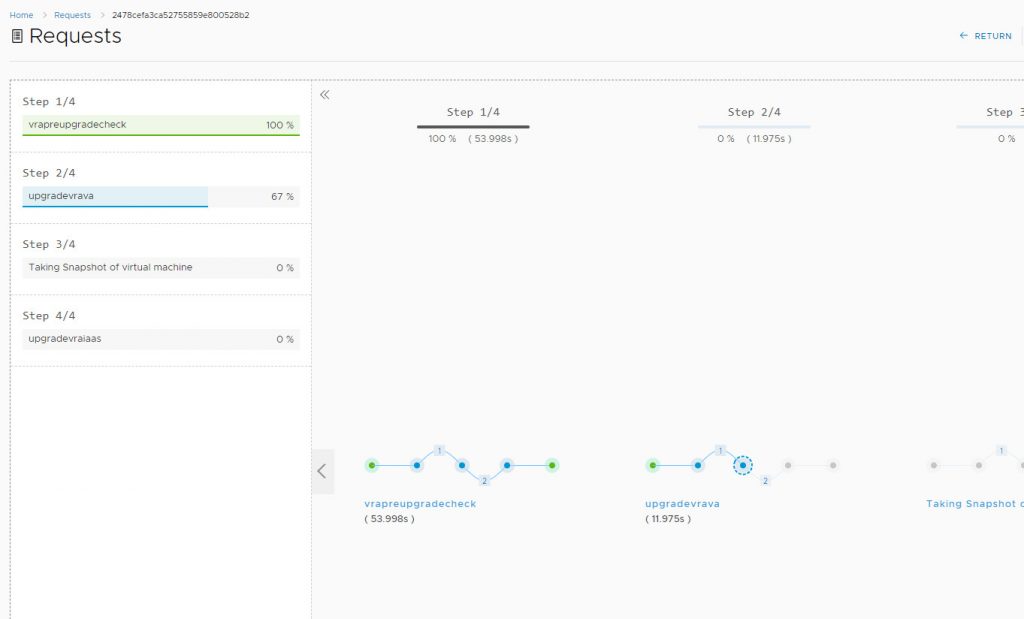
However! when it came to upgrading the IaaS servers, it failed and gave me this lovely error message.
com.vmware.vrealize.lcm.common.exception.EngineException: {"status": "Failed", "statusText": "Upgrade failed.", "commands": [{"node": {"nodeHost": "web1.definit.local", "version": "7.2.0.9518", "nodeType": "Database", "nodeId": "EE5A021D-2A11-4158-9EEC-9A5F758E91DD"}, "continueOnError": false, "command": "upgrade-server", "log": null, "parameters": [], "error": "Failed to execute command upgrade-server on node web1.definit.local", "validate": false, "waitAfterInSeconds": null, "status": "Failed", "message": "Upgrading server components for node web1.definit.local. Note: This may take up to 30 minutes."}, {"node": {"nodeHost": "web1.definit.local", "version": "7.2.0.9518", "nodeType": "DemWorker", "nodeId": "EE5A021D-2A11-4158-9EEC-9A5F758E91DD"}, "continueOnError": false, "command": "upgrade-dem", "log": null, "parameters": [], "error": null, "validate": false, "waitAfterInSeconds": null, "status": "Pending", "message": "Upgrading DEM components for node web1.definit.local ..."}, {"node": {"nodeHost": "web1.definit.local", "version": "7.2.0.9518", "nodeType": "vSphereAgent", "nodeId": "EE5A021D-2A11-4158-9EEC-9A5F758E91DD"}, "continueOnError": false, "command": "upgrade-agent", "log": null, "parameters": [], "error": null, "validate": false, "waitAfterInSeconds": null, "status": "Pending", "message": "Upgrading proxy agent component for node web1.definit.local ..."}, {"node": {"nodeHost": "web1.definit.local", "version": "7.2.0.9518", "nodeType": "ManagerService", "nodeId": "EE5A021D-2A11-4158-9EEC-9A5F758E91DD"}, "continueOnError": false, "command": "toggle-manager-service-failover-mode", "log": null, "parameters": [{"name": "NewState", "value": "Enabled"}], "error": null, "validate": false, "waitAfterInSeconds": null, "status": "Pending", "message": "Enabling ManagerService automatic failover mode for node web1.definit.local ..."}], "startTime": 1554298002.529656}
    at com.vmware.vrealize.lcm.core.vra70.task.upgrade.VraIaasUpgradeTask.execute(VraIaasUpgradeTask.java:104)
    at com.vmware.vrealize.lcm.platform.automata.service.Task.retry(Task.java:80)
    at com.vmware.vrealize.lcm.platform.automata.core.ExecutionTask.run(ExecutionTask.java:39)
    at java.util.concurrent.ThreadPoolExecutor.runWorker(ThreadPoolExecutor.java:1149)
    at java.util.concurrent.ThreadPoolExecutor$Worker.run(ThreadPoolExecutor.java:624)
    at java.lang.Thread.run(Thread.java:748)
While this error maybe clear to some for me it was not very helpful.
So I reverted upgrading the IaaS components manually and this was the more helpful error message I encountered.
[master] vra1:/usr/lib/vcac/tools/upgrade # ./upgrade
IaaS upgrade is pending: Waiting for VA services to start...
All VA services have started.
Upgrade of IaaS to version 7.5.0.14711 is starting.
Upgrading server components for node web1.definit.local. Note: This may take up to 30 minutes.
Executing shell command: /usr/sbin/vra-command execute --node EE5A021D-2A11-4158-9EEC-9A5F758E91DD --timeout 120 --json true upgrade-server
Command execution result:
Command id: 4bd2674e-1b93-6151-245a-4d7352811156
   Type: upgrade-server
   Node id: EE5A021D-2A11-4158-9EEC-9A5F758E91DD
   Node host: web1.definit.local
   Result: Java version 1.8 update 181 or higher (64-bit) must be installed, the environment variable JAVA_HOME must be set to the Java install folder, and %JAVA_HOME%\bin\java.exe must exist.
   Error: {u'10031': [{u'resultMsg': u'Java version 1.8 update 181 or higher (64-bit) must be installed, the environment variable JAVA_HOME must be set to the Java install folder, and %JAVA_HOME%\\bin\\java.exe must exist.', u'resultDescr': None}]}
   Status: FAILED
Failed to execute command upgrade-server on node web1.definit.local
Traceback (most recent call last):
  File "./upgrade", line 628, in executeCommand
    result = self.execVraCommandWithRetry(command.command, command.node, command.parameters, command.continueOnError, command.validate)
  File "./upgrade", line 377, in execVraCommandWithRetry
    raise Exception(err_template % (command, node['nodeHost']))
Exception: Failed to execute command upgrade-server on node web1.definit.local
Validation failed on node web1.definit.local.
Failed to execute command upgrade-server on node web1.definit.local
Traceback (most recent call last):
  File "./upgrade", line 860, in execute
    self.executeCommand(command)
  File "./upgrade", line 648, in executeCommand
    raise e
Exception: Failed to execute command upgrade-server on node web1.definit.local
Failed to execute command upgrade-server on node web1.definit.local
Traceback (most recent call last):
  File "./upgrade", line 865, in execute
    raise e
Exception: Failed to execute command upgrade-server on node web1.definit.local
Upgrade failed.
Restoring Postgres replication mode...
Postgres replication mode set to SYNC.
Essentially what this all boils down to is that vRA -NEEDS- Java version 181. While the VMware documentation says 181 or later, (I had a slightly later version install on the IaaS server) the upgrade process just fails horribly.
So I removed JAVA from the IaaS server and installed specifically the 181 version and voila the manual upgrade was successful. Interestingly I did try the automatic upgrade via vRLCM after install Java 181 but it still failed.
Either way it is something to watch out for.