Up until recently I’ve been running a Windows Server Core VM with Active Directory, DNS and Certificate Services deployed to provide some core features in my home lab. However, I’ve also been conscious that running a lab on old hardware doesn’t exactly have much in the way of green credentials. So, in an effort to reduce my carbon footprint (and electricity bill) I’ve been looking for ways to shut down my lab when it’s not in use.
As a result of this, I’ve migrated a lot of the things I need running 24x7 (plex, home automation, unifi, openVPN, emonCMS) to running on Kubernetes on a RaspberryPi cluster, and it works pretty well for me. One nice to have though, was custom DNS resolution for these home services. I started looking at running BIND in a container on Kubernetes, but found that either the images available were not ARM compatible, or that they were generally not great. Then it struck me that there was already a very good DNS implementation on each node of my Kubernetes cluster - CoreDNS!
CoreDNS is written in Go and has been part of Kubernetes clusters since v1.11 - it replaced kube-dns (which ran multiple containers) with as single process, and has a pretty good eco-system of plugins to enhance functionality as required. It is actually possible to configure aliases, and even add a custom zone to the kube-system CoreDNS server. But, all of this involves modifying the configuration of the kube-system configuration, and it just doesn’t sit quite right. I want my Kubernetes clusters to be as simple as possible.
However, CoreDNS is a general-purpose DNS server, and I know it will run on my Kubernetes cluster just fine because it already is! I set about recreating my Lab DNS zone (definit.local) using CoreDNS - here’s what I ended up with:
- Namespace - a container to run my CoreDNS
- ConfigMaps - configuration of my Corefile and DNS Zone file(s)
- Deployment - deployment specification of the CoreDNS pods
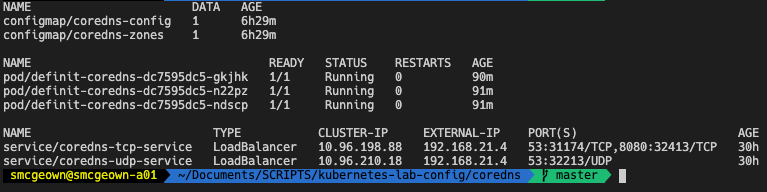
- Services - MetalLb load balancer to provide a HA access for my network
Namespace#
The namespace is pretty self explanatory…
kind: Namespace
apiVersion: v1
metadata:
name: corednsConfigMaps#
I played about with various configurations of ConfigMaps in the setup, and in the end decided to separate the Corefile (which is the central CoreDNS configuration file) and the DNS Zones into separate ConfigMaps.
The coredns-config ConfigMap tells CoreDNS how to run, and what plugins to load. It is mounted into the /etc/coredns folder later in the deployment configuration. Since I don’t really want to restart my CoreDNS servers every time I make a change to a DNS zone, I am using the auto plugin to automatically load zone files (either new, or with a SOA Serial change) that are mounted in the /etc/core/zones folder. The second ConfigMap coredns-zones is mounted into the /etc/core/zones folder and provides the actual DNS zone information.
The log and errors plugins are self-explanatory, they tell CoreDNS to write the log and errors to STDOUT. The reload plugin allows me to reload configuration from the Corefile whenever changes are made, it will check every 30 seconds. The loadbalance module will round-robin dns A, AAAA, and PTR records.
Finally, the health and ready plugins will provide HTTP responses for the deployment health and ready probes.
apiVersion: v1
data:
  Corefile: |
    .:53 {
        # Automatically load zone files mounted in the "zones" directory
        auto {
            directory /etc/coredns/zones
        }
        # Enable logging to STDOUT
        log
        # Print errors to STDOUT
        errors
        # Automatically load changes to the Corefile
        reload 30s
        # Round-robin A, AAAA and PTR records
        loadbalance
        # Return HTTP 200 OK on :8080 when CoreDNS is running
        health
        # Return HTTP 200 OK on :8081 when CoreDNS and plugins are ready
        ready
    }
kind: ConfigMap
metadata:
  name: coredns-config
  namespace: coredns
The actual DNS zone data itself is stored in the coredns-zones ConfigMap, and as I mentioned before is mounted into the /etc/core/zones folder, from where the Corefile has specified that it will automatically load zones that are new, or have a SOA Serial increment. For brevity, this is just a snip of my DNS zone!
apiVersion: v1
data:
  db.definit.local: |
    $TTL  30M
    @   IN  SOA  ns1.definit.local.  definit.local.  (
                    2019041900  ; Serial
                    4H          ; Refresh
                    1H          ; Retry
                    7D          ; Expire
                    4H )        ; Negative Cache TTL
        IN  NS  ns1

    ns1                       IN  A   192.168.21.4
    pihole.definit.local.     IN  A   192.168.21.3
    unifi.definit.local.      IN  A   192.168.21.10
    vault.definit.local.      IN  A   192.168.21.11
    syn-ds-01.definit.local.  IN  A   192.168.4.10
    edgerouter                IN  A   192.168.1.1
    sg300-10                  IN  A   192.168.9.2
    sg300-20                  IN  A   192.168.100.3

kind: ConfigMap
metadata:
  name: coredns-zones
namespace: corednsDeployment#
The deployment spec is pretty simple, it calls for 3 replicas of the CoreDNS container image to be running (one per worker node in my Kubernetes cluster). There is a -conf argument telling CoreDNS where to look for the Corefile configuration file. The containers allow both TCP and UDP connections on port 53 (though CoreDNS can run other protocols for DNS, such as TLS, HTTP, RPC). Both the livenessProbe and readinessProbe point to the /health and /ready plugins configured in the Corefile. Finally, the Volumes and VolumeMounts map the contents of the ConfigMaps (shown above) as files in the /etc/core folder.
apiVersion: apps/v1
kind: Deployment
metadata:
  name: definit-coredns
  namespace: coredns
  labels:
    app.kubernetes.io/name: coredns
    app.kubernetes.io/instance: definit-coredns
spec:
  replicas: 3
  selector:
    matchLabels:
      app.kubernetes.io/name: coredns
      app.kubernetes.io/instance: definit-coredns
  template:
    metadata:
      labels:
        app.kubernetes.io/name: coredns
        app.kubernetes.io/instance: definit-coredns
    spec:
      containers:
      - name: coredns-lab
        image: coredns/coredns:latest
        imagePullPolicy: Always
        args: [ "-conf", "/etc/coredns/Corefile" ]
        ports:
          - name: dns-tcp
            containerPort: 53
            protocol: TCP
          - name: dns-udp
            containerPort: 53
            protocol: UDP
        livenessProbe:
          httpGet:
            path: /health
            port: 8080
            scheme: HTTP
          initialDelaySeconds: 60
          timeoutSeconds: 5
          successThreshold: 1
          failureThreshold: 5
        readinessProbe:
          httpGet:
            path: /ready
            port: 8181
            scheme: HTTP
          initialDelaySeconds: 10
          timeoutSeconds: 5
          successThreshold: 1
          failureThreshold: 5
        volumeMounts:
        - mountPath: "/etc/coredns/Corefile"
          subPath: "Corefile"
          name: coredns-config-volume
        - mountPath: "/etc/coredns/zones"
          name: coredns-zone-volume
      restartPolicy: Always
      volumes:
        - name: coredns-config-volume
          configMap:
            name: coredns-config
            items:
              - key: Corefile
                path: Corefile
        - name: coredns-zone-volume
          configMap:
name: coredns-zonesServices#
Finally, in order to allow clients on my network to query the CoreDNS servers, and to provide a little bit of resilience, I have a MetalLb load balancer configured to provide access to the nodes. Because Kubernetes can’t yet support multi-protocol load balancers, I have to configure both a TCP and UDP service. By specifying the same loadBalancerIp, MetalLb will use the same external IP address for both. From there, MetalLb peers with my physical routers via BGP and advertises the address via a /32 route.
apiVersion: v1
kind: Service
metadata:
  labels:
    app.kubernetes.io/name: coredns
    app.kubernetes.io/instance: definit-coredns
  annotations:
    metallb.universe.tf/allow-shared-ip: coredns
  name: coredns-tcp-service
  namespace: coredns
spec:
  ports:
  - port: 53
    targetPort: 53
    protocol: TCP
    name: dns-tcp
  selector:
    app.kubernetes.io/name: coredns
    app.kubernetes.io/instance: definit-coredns
  loadBalancerIP: "192.168.21.4"
  type: LoadBalancer
  sessionAffinity: None
  externalTrafficPolicy: Local

---

apiVersion: v1
kind: Service
metadata:
  labels:
    app.kubernetes.io/name: coredns
    app.kubernetes.io/instance: definit-coredns
  annotations:
    metallb.universe.tf/allow-shared-ip: coredns
  name: coredns-udp-service
  namespace: coredns
spec:
  ports:
  - port: 53
    targetPort: 53
    protocol: UDP
    name: dns-udp
  selector:
    app.kubernetes.io/name: coredns
    app.kubernetes.io/instance: definit-coredns
  loadBalancerIP: "192.168.21.4"
  type: LoadBalancer
  sessionAffinity: None
  externalTrafficPolicy: Local
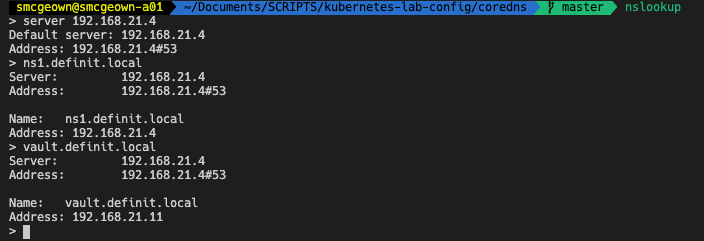
And that’s that - simple! My own custom CoreDNS service running on Kubernetes. If I want to update the configuration, or a zone file, I simple update the ConfigMap YAML and apply it, and within 60 seconds the DNS zone has updated!