

We’re all increasingly used to writing prompts for an AI model to solve a problem for us, and more recently we’ve moved into the use of “Agentic AI” - autonomous AI agents to complete tasks while we sit back and put our feet up do something else productive. The whole AI world is a fast-moving, constantly evolving technology field. The moving parts and standards are being defined, adopted and retired far quicker than ever.
I’m still very much a learner here, and the landscape is still evolving - no doubt that within a month or two this will be out of date. I’ve been trying to create a simple mental model that I can use when understanding the world of skills and MCP servers, and how it relates to context for your AI model.
Understanding the parts#
My first step was to try and define what each “part” does, before I fit them into the wider picture. On the surface some of these parts seem to do the same job, or at least overlap significantly, so having a really good definition of what each part does really help clarify my understanding.
AI Model (LLM)#
At the heart of every AI agent is a Large Language Model (LLM), this is the reasoning engine that reads your input and decides what to do next. An LLM is a type of AI model trained on vast amounts of text, which gives it the ability to understand natural language, generate coherent responses, write and reason about a problem, and make decisions based on context.
AI Agent#
An Agent is a piece of software that works with AI models and can take actions on your behalf autonomously, rather than just responding to questions as you prompt. It uses a “think-act-observe” feedback loop to achieve the task you give it. Where an AI model can tell you how to do something, an agent actually does the work: for a task like refactoring a codebase, it reads the files, makes changes, runs tests, and fixes anything that breaks, all without you having to prompt it at each stage.
I found this description from the HuggingFace website was helpful to understand the “think-act-observe” loop that AI agents use to do their work:
- Thought: The LLM part of the Agent decides what the next step should be.
- Action: The agent takes an action by calling the tools with the associated arguments.
- Observation: The model reflects on the response from the tool.
Context#
Context is everything the AI model can “see” at a given moment: your questions, the conversation so far, any documents or data it has been given, and any tool results it has received. It’s like the model’s short-term memory. There’s a limit to how much it can hold at once, and when that fills up, older information gets pushed out or performance drops.
Tool#
A Tool is something an AI Model can use to get things done. Just like you might use a web browser to look something up or a terminal to run a command, an agent uses Tools to take action beyond just generating text. For example, a Tool might let it read a file, run some code, or fetch the latest documentation from the internet.
MCP Servers#
An MCP server is a way of giving an AI model access to specific Tools and data sources in a safe, controlled way. Instead of the model having unrestricted access to your systems, the MCP server acts as a middleman: it exposes a defined set of capabilities (like searching a database, fetching documentation, or triggering a workflow), and the model can only do what that server allows. This makes it practical to connect AI to real systems without giving it the keys to everything.
Skills#
Skills are sets of instructions that tell an AI model how to do a specific task well. Rather than figuring out the best approach from scratch every time, the model can read the Skill first and follow proven guidance, like knowing which libraries to use, how to structure the output, or what common mistakes to avoid. It’s a way of packaging up expertise so the model can apply it consistently. Skills also use something called “progressive disclosure”, meaning the AI model will only load their metadata into it’s Context. The metadata is used to pick a Skill to use for a task, and only then are the additional instructions are loaded into Context.
Instructions Files#
An instructions file (such as copilot-instructions.md, AGENTS.md, or CLAUDE.md), sometimes called a context file is a persistent and universal “readme” for the AI model, which provides global rules and context for every interaction. This is where it differs from Skills - instructions files are for rules, standards and context the AI model should always know, whereas Skills are dynamic and specialised - loaded only when needed.
Connecting the parts#
Now that I’ve defined the parts, I need to understand how they all relate and work together.
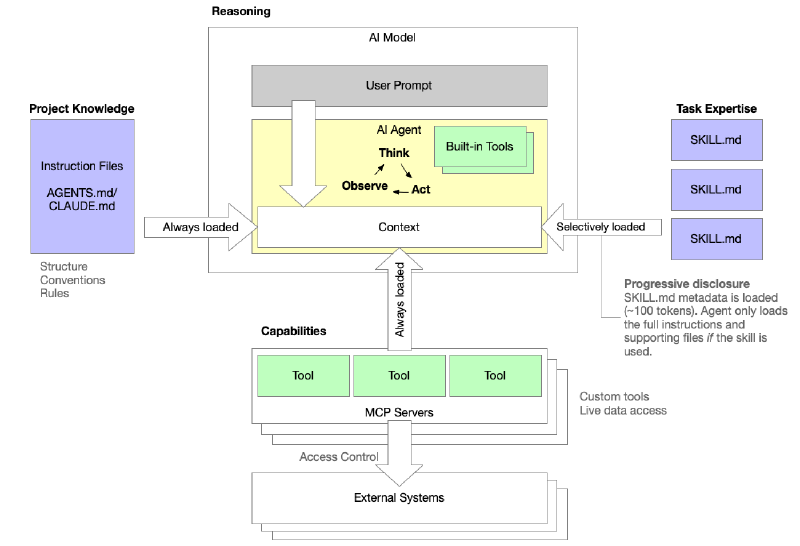
When a user sends a prompt, it lands in the AI model’s context window alongside everything else the agent needs to act: the project’s instruction files (such as CLAUDE.md or AGENTS.md), the tools exposed by any connected MCP servers, and the results of any tool calls it makes along the way. Instruction files are always loaded, so the agent consistently knows the project’s structure, conventions, and rules before it reads a single word of your prompt. MCP servers provide the agent with custom Tools and live data access, and the definitions for those tools are loaded directly into context, making them available for the agent to call just like any built-in tool. Skills, however, are handled differently. Rather than loading every SKILL.md file and it’s associated examples in full, only a small metadata summary (around 100 tokens) is loaded upfront. The full instructions are only pulled in if the agent actually needs that skill, which is “progressive disclosure”.
The agent itself operates in a tight Think → Act → Observe loop, reasoning over whatever is in context, taking actions via its tools, and folding the results back in, iterating until the task is done.
When should I use Instructions, Skills, or MCP servers?#
It’s all about Context - remember, Context is everything the AI model can “see” at a given moment - and if we overload that, it will seriously impact the performance of the model. When you are using an AI agent to generate code the context can grow rapidly as code is generated, read and edited.
- Instructions tell the model about your world and let you set the scene for the project
- Skills tell it how to do a type of work well, provide knowledge, context, examples and understanding on how to complete a task
- An MCP server provides you with the ability to execute an action or access live data
| Instructions | Skills | MCP servers | |
|---|---|---|---|
| What it is | A markdown file in your codebase | A set of instructions for a specific task | A live software service |
| What it does | Tells the agent about your project: structure, conventions, rules | Tells the model how to do a particular type of work well | Gives the model access to real tools and live data |
| Who writes it | You, the developer | Experts who’ve refined best practices | Developers building integrations |
| When it’s used | Every time the agent works in that codebase | When a relevant task is requested | When the model needs to take action in the real world |
| Example | “Our project uses TypeScript, tests live in /tests, never edit generated files” | “Here’s how to create a high quality Word document” | “Here’s a tool to fetch live Terraform documentation” |
| Requires running software? | No | No | Yes (but can run as a service) |
Final thoughts#
I hope this has helped you in some way to increase your understaning of how instructions, skills and MCP servers relate to context, and how context affects your AI agent. As we shift to becoming architects of our own agentic AI workforce we need to understand how to best inject our specific knowledge and skills into the work being done on our behalf.
This has been a difficult post to write because it’s a theory-heavy post and I tend to prefer a more practical approach where I can learn by doing. In my next post I’ll show a concrete example of how to set up a VSCode environment to generate Terraform code using the HashiCorp Skills and the Terraform MCP server to write high-quality code.
Until next time!