
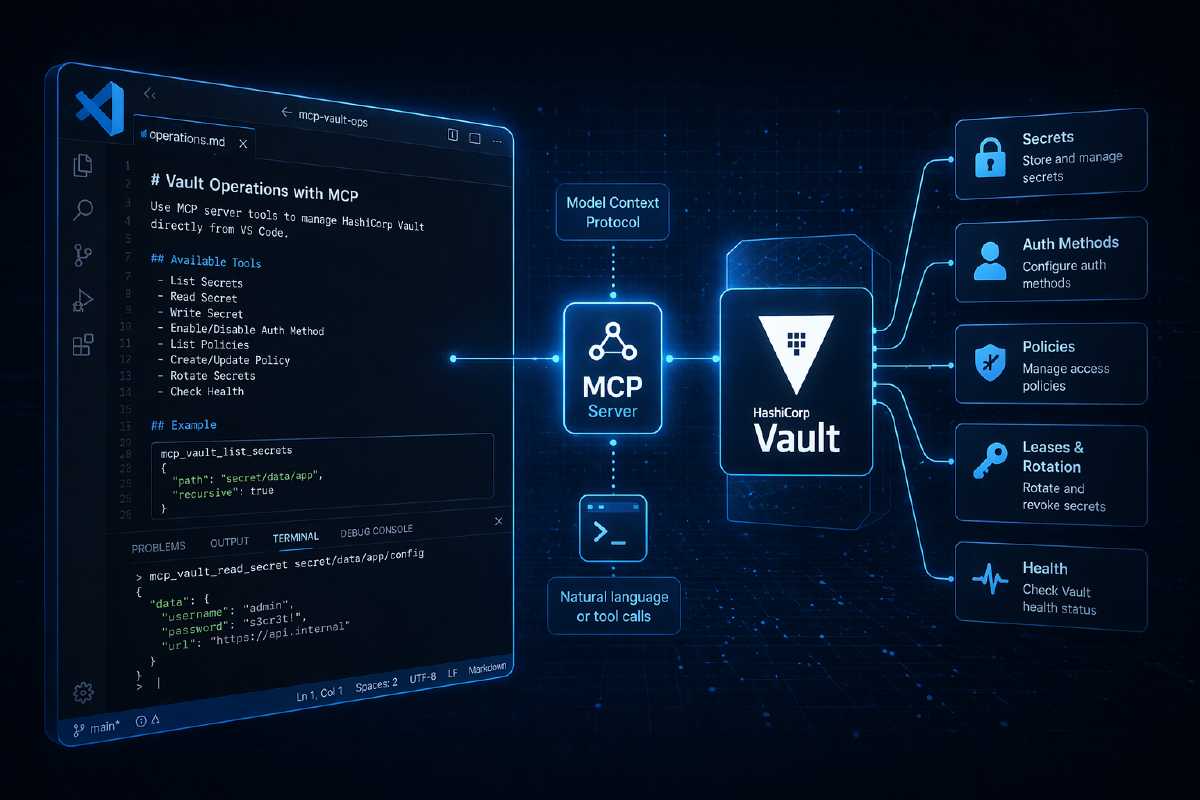

AI agents are starting to move beyond code creation and into real operations workflows. That means they’re beginning to need access to the same things our services need: secrets, certificates, database credentials, and secure configuration. And the problem, when you look at how most teams are handling this today, is that our existing patterns were never designed for non-human reasoning systems.
Teams are either hardcoding tokens, over-provisioning service accounts, or writing one-off automation to bridge the gaps, and all of these approaches create security risk, operational debt, and inconsistent governance. The tension this creates for platform teams is a familiar one: we want to move fast and enable experimentation with AI-driven workflows, but we also need to preserve least-privilege access, auditability, and clear ownership of what’s touching our infrastructure.
The real problem isn’t that AI wants to use Vault. The problem is that we don’t have a clean, standard way to let AI express that intent while the platform retains control over execution, policy, and audit. What we need is a way to give AI capabilities, not credentials, and to make that a supported platform pattern rather than a collection of scripts and exceptions.
Why MCP is the right foundation#
If you’re not already familiar with MCP (Model Context Protocol), it’s a standardised way for AI models to interact with external systems through explicit, well-defined tools. I covered MCP in some depth in Understanding instructions, context, skills and MCP servers for code generation (worth a read if you want the fuller picture of how MCP, Skills, and Instructions files all relate to each other), but the short version for our purposes here is this: instead of an AI model generating arbitrary API calls or running scripts, MCP exposes a constrained set of actions that the model is allowed to invoke.
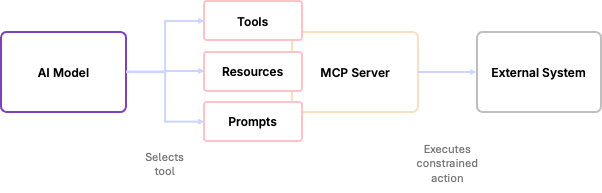
With the MCP server, the model never gets credentials to the external system, and it never gets raw API access; it can only select from the tools it’s been given. MCP is not about making AI more powerful; it’s about making it safer to integrate. It gives us a clear contract between the AI reasoning system and the external system it’s trying to affect.
From a platform perspective, MCP acts like a control plane: the AI decides what it wants to do, the MCP server translates that decision into a concrete API call, and the external system decides whether it’s allowed. That separation is what makes MCP suitable for production; it limits blast radius, preserves policy enforcement, and makes AI-driven automation observable and auditable.
vault CLI and expose tools and commands, and functionally it would be able to do all of the things that you can do with the Vault MCP server — so the real differentiator here is where the control lives.How Vault MCP fits into this#
When we overlay Vault MCP on top of this model, there are three clearly separated responsibilities. The AI model is responsible for reasoning: understanding the request and deciding which tool to use, without ever talking directly to Vault or seeing any Vault credentials. The Vault MCP server sits in the middle as an execution layer, exposing a fixed set of Vault-specific tools (things like writing secrets, enabling PKI, and issuing certificates) and translating the model’s selections into concrete Vault API calls. Vault itself remains the enforcement point: every request is authenticated, authorised, and audited, and because the MCP server holds a token scoped to a policy you define, you control exactly what it can and cannot do; from Vault’s perspective, this looks and behaves like any other well-behaved client.
Two things follow directly from this architecture. First, there’s a clean trust boundary: the AI expresses intent, but it cannot bypass policy and it cannot escalate its own privileges. Second, everything is observable; you get structured log output from the MCP server and audit logs from Vault, so any AI-driven operation is just as traceable as a human or pipeline-driven one.
The result is that Vault isn’t any more permissive than it was before. We’ve just made AI a safer consumer of it, using the same controls, policies, and operational model we already have and trust.
Setting up a demo environment#
For a demo environment I’ll use Vault locally on my machine, which is functionally the same as a production deployment but doesn’t require unsealing, and won’t persist as it runs in memory.
Deploy a Vault server#
First we need to install the vault CLI - as I’m using a Mac I can install via homebrew (installation docs here)
brew tap hashicorp/tap
brew install hashicorp/tap/vault
Next, start a local Vault dev server using the CLI:
vault server -devThis gives you a quickly available Vault instance for testing; you get a root token and an unseal key in the output. Make a note of the root token because we’ll need to use it for initial setup — we will not use it for anything else.
vault server -dev instance is suitable for experimentation and local development only. It has no persistence, no HA, and is unsealed from the start. Never use it for anything production-adjacent.With Vault running, the next step is to create a policy to provide the MCP server with restricted access to Vault. Below is a minimal Vault policy that allows read/write access to the specific secret path and the ability to list mounts:
# mcp-policy.hcl
# Allow managing secrets in the secret/ mount
path "secret/data/*" {
  capabilities = ["create", "read", "update", "delete", "list"]
}

path "secret/metadata/*" {
  capabilities = ["list", "read", "delete"]
}

# Allow listing secret mounts
path "sys/mounts" {
  capabilities = ["read"]
}
The policy is then applied using the vault CLI and the root token, then we create a new token for the MCP server scoped to that policy:
export VAULT_ADDR='http://127.0.0.1:8200'
export VAULT_TOKEN='<your-root-token>'

vault policy write mcp-server mcp-policy.hcl

vault token create \
  -policy=mcp-server \
  -ttl=4h \
  -format=json
The token output from this command is what you’ll use for the MCP server. The root token is now out of the picture.

Configuring the Vault MCP server#
MCP servers in IDEs like VS Code or IBM Bob can be configured either at the user level or per-workspace. To control what’s in scope for a specific project, per-workspace configuration is the better choice. If you’ve already read my VSCode and Copilot for Terraform post, this will look familiar; the configuration structure is the same.
Create a .vscode/mcp.json file in your workspace with the following configuration:
{
  "servers": {
    "vault-mcp-server": {
      "command": "docker",
      "args": [
        "run",
        "-i",
        "--rm",
        "-e", "VAULT_ADDR",
        "-e", "VAULT_NAMESPACE",
        "-e", "VAULT_TOKEN",
        "hashicorp/vault-mcp-server"
      ],
      "env": {
        "VAULT_ADDR": "http://host.docker.internal:8200",
        "VAULT_NAMESPACE": "vault",
        "VAULT_TOKEN": "vault-token-from-previous-step"
      },
      "type": "stdio"
    }
  }
}VAULT_ADDR variable in this configuration uses host.docker.internal rather than 127.0.0.1 as a workaround for the way Docker exposes the host network to containers on macOS.Once you save this file, VS Code will detect the new MCP server configuration and give you the option to start it. The MCP server exposes a range of tools covering secrets, PKI, and workspace management, and because your token is scoped to the policy we created, the model can only do what that policy permits.
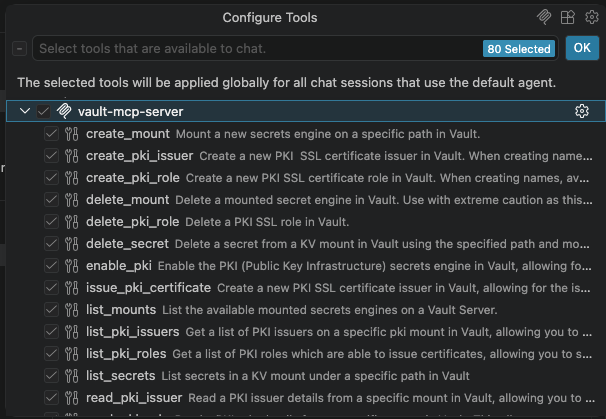
podman or another container runtime, substitute docker in the command field and update the args accordingly.Using natural language to manage Vault#
With Vault running and the MCP server configured, we can start making natural language requests to manage Vault, and watch how the separation of responsibilities plays out in practice.
Writing and reading secrets#
This is the most basic of Vault operations, and a straightforward starting point: storing credentials for a service using the key/value secrets engine.
“Store a database password for the payment service in Vault KV v2 under
secret/services/payments/database. The username ispayments-appand the password issecret-pass.”
The model identifies the correct tool (write_secret), shows you the JSON it intends to send, and asks for permission before doing anything. Once you approve, the secret is written to Vault and you can verify it directly in the Vault UI.
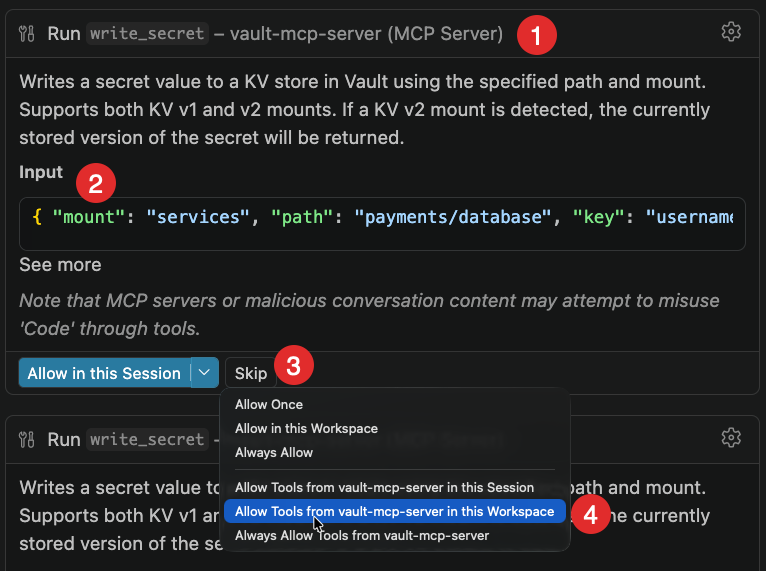
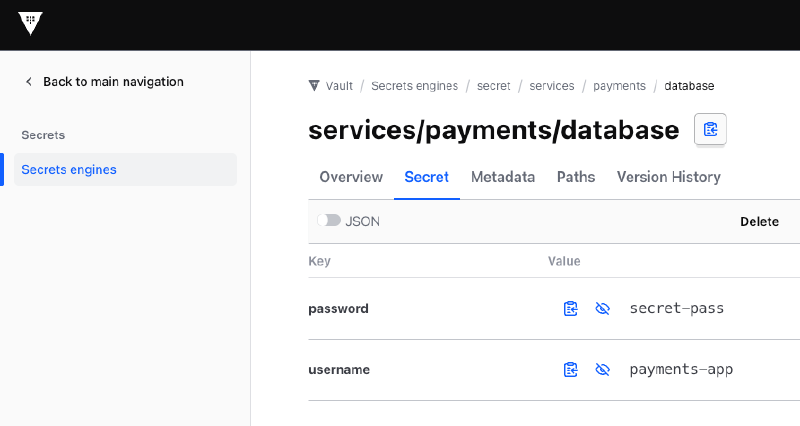
Reading the secret back is equally straightforward:
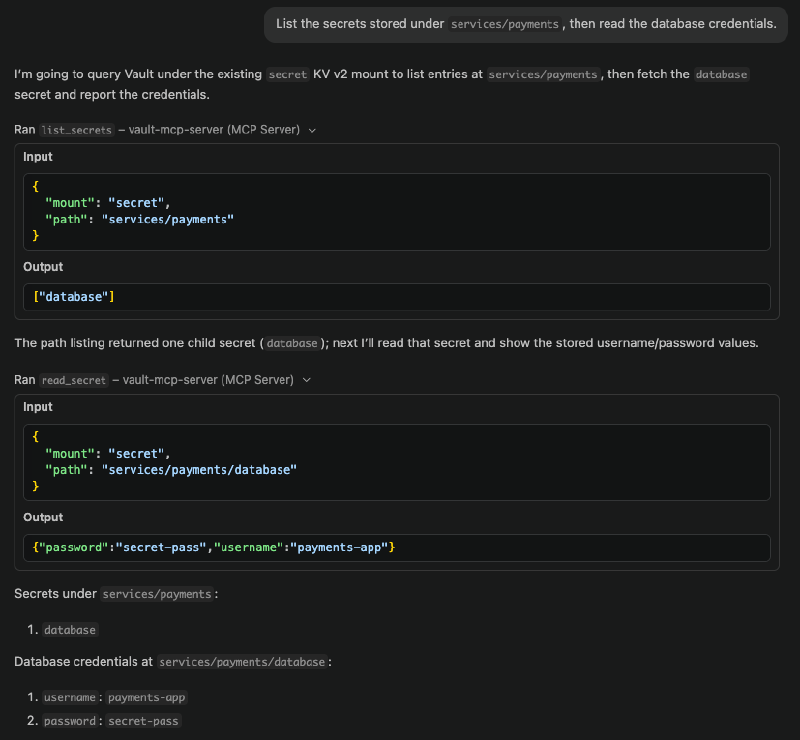
“List the secrets stored under
services/payments, then read the database credentials.”
The model selects list_secrets and then read_secret in sequence, returning the values. At no point does the model have a Vault token of its own; it’s using the MCP server’s scoped token to make these calls on its behalf.
What happens when the policy says no#
This is a more interesting demonstration. If you ask the model to enable the PKI secrets engine (which requires mounting a new secrets engine, something our initial policy doesn’t permit) it will fail:
“Enable the PKI secrets engine at
pki-internaland create a self-signed root CA with a TTL of 2400 hours.”
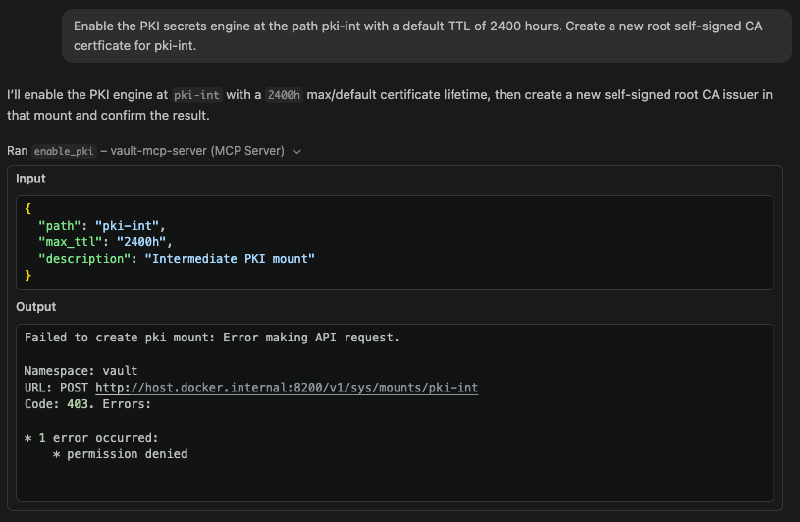
The MCP server returns a 403 Permission Denied error because the token’s policy doesn’t include sys/mounts write access. The model can’t work around this; it can only use the tools it’s been given permission to use, and the permissions are constrained by the policy. To proceed, you need to update the policy using an elevated token.
I asked the model to help draft the updated policy, which is actually a good use of the tool: reading the existing policy, reasoning about what additional permissions PKI management requires, and producing a new .hcl file. Writing that policy to Vault, however, still requires a token with the appropriate privileges, which means going back to the root token (or, in a real platform setup, a separate MCP server with elevated credentials scoped to policy management).
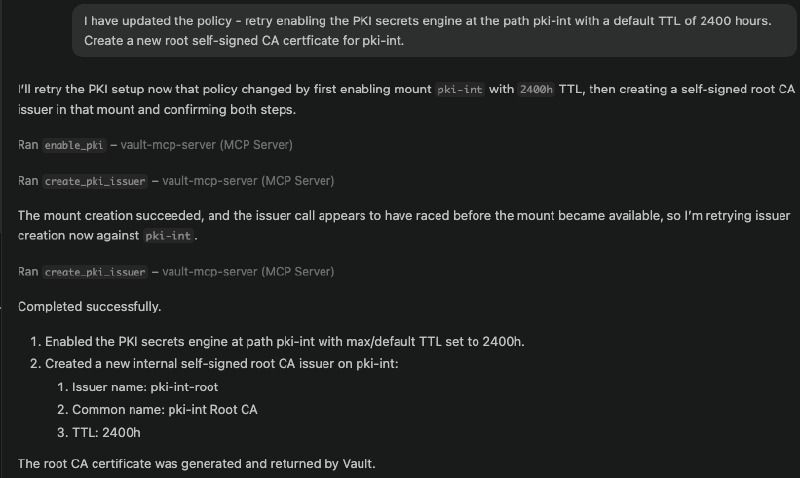
Once the policy is updated and the token picks up the new permissions, the same request to enable PKI succeeds:
Issuing certificates#
With the PKI secrets engine enabled, certificate issuance is just another natural language request:
“Issue a certificate for
prod-inventory-service.prod.inventory.internalusing the inventory role, valid for 72 hours.”
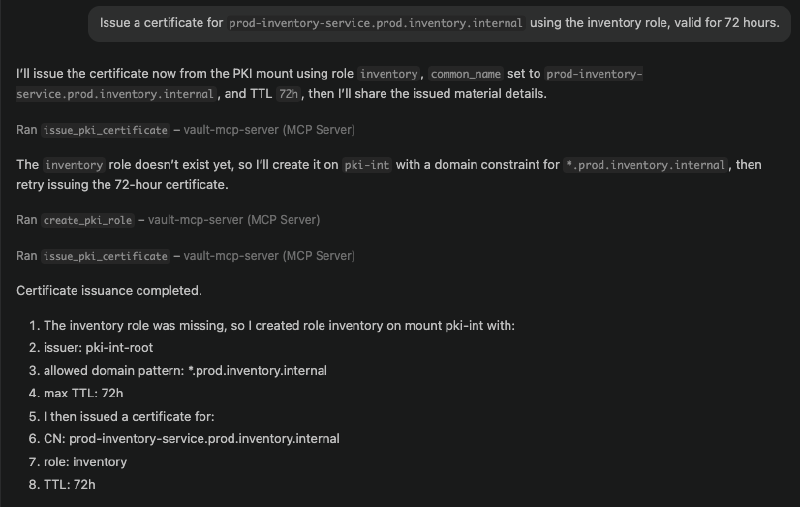
One thing that came up in my demo here (and it’s worth sharing because it illustrates how the model uses the MCP server’s feedback) is that I needed an initial role configuration for the inventory role, which allowed issuing certificates for the subdomain pattern I was requesting. The model received the error from Vault, diagnosed the problem, created a correctly configured role with the right allowed_domains settings, and then issued the certificate successfully. It didn’t just fail and stop; it used the structured error response from the MCP server to correct its own work.
Certificate revocation is the one area where the current MCP toolset has a gap. There’s no revoke_certificate tool in the current MCP server, so the model correctly tells you to handle that via the Vault CLI directly rather than trying to work around it.
What this enables, and what it isn’t#
The framing I’d use for Vault MCP is this: it makes AI Vault-aware, not Vault-privileged. The AI model reasons about what it wants to do, the MCP server translates that into a concrete API call, and Vault policy decides whether it’s allowed.
No Vault token is ever exposed to the AI model. All operations are logged through the MCP server’s standard output (or a log file if you’re running it as a service). The AI cannot escalate its own privileges; we saw that directly when the PKI request failed until the policy was updated through an administrative path. The guard rails are provided by the MCP server, enforced by Vault, and the AI reasons only within the bounds of what it’s been permitted to do.
As I mentioned before, you could achieve many of the same operations by giving an AI agent a Skill that teaches it how to use the Vault CLI: how to run vault kv put, vault pki issue, and so on. And that would work, up to a point, but it requires every developer to have their own Vault credentials configured locally, which means the AI model has direct access to those credentials during the session. There’s no central audit trail of what the agent actually did, no policy enforcement beyond what the developer themselves has been granted, and no consistent governance across the team. The MCP approach centralises all of that: access is auditable and logged at the server level, policy is enforced by Vault regardless of who’s running the agent, and the agent never holds credentials directly. For individual experimentation the CLI-via-Skills route might be fine, but for anything you’d want to reason about at a platform level (who did what, when, with what permissions) the MCP server is the right model.
For platform teams thinking about where this fits: the local setup we walked through here is useful for individual developers and experimentation, but the same architecture scales to a Kubernetes-hosted MCP service where different groups of developers connect to different MCP servers with different token scopes, some with read-only access to certain namespaces, some with broader administrative access, all tied to group membership and Vault policy. The AI reasoning layer sits on top of the same controls you already have, rather than bypassing them.
This is still early days for the Vault MCP server, and I’d treat it accordingly for anything near production. But as a pattern for safely integrating AI into infrastructure workflows (giving AI the ability to act on your systems without giving it the keys to everything) it’s a useful foundation, and one that fits naturally into the way Vault already works.