

In the first post of this series I walked through the setup and configuration of Vault Secrets Operator (VSO), using Vault Kubernetes Authentication to grant access to static secrets based on the Kubernetes Service Account identity. I also showed the configuration of client cache encryption using the Vault Transit secrets engine, so VSO could encrypt its access tokens at rest in etcd.
That post finished with a working identity chain and a secret landing in the cluster, which is a reasonable place to stop if the secret never changes. It does change eventually, and usually at an inconvenient moment. In this post I am going to look at how you rotate a static secret, and the mechanisms VSO gives you to control what happens when you do.
Rotating static secrets#
One of the issues with static secrets is that, by nature, they are static.
Let’s take another one of my regularly deployed applications, ExternalDNS. This project creates DNS records for your services (or ingresses, gateways, loadbalancers) with your DNS provider. To do that it needs a secret to authenticate with your DNS provider, which I’ve created using a VaultStaticSecret just like in my cert-manager example.
apiVersion: secrets.hashicorp.com/v1beta1
kind: VaultStaticSecret
metadata:
  name: external-dns-secret
  namespace: infrastructure
spec:
  type: kv-v2
  mount: kv
  path: clusters/dell7040/infrastructure/external-dns
  destination:
    name: external-dns-secret
    create: true
  refreshAfter: 30s
  vaultAuthRef: external-dns-vault-auth
Now, let’s assume my token has expired, or was accidentally committed to a public GitHub repository published somewhere I would rather it hadn’t been, and I need to replace it. Updating the value in Vault is straightforward, and the VaultStaticSecret above polls every 30 seconds (refreshAfter: 30s), so the Kubernetes Secret object will be holding the new token within half a minute - the ExternalDNS pods will still be using the old one.
Getting the new value into the pod#
A Kubernetes Secret reaches an application in one of two ways, and when the underlying value changes it doesn’t necessarily change in the running app.
If the secret is consumed as environment variables, using env or envFrom, those values are read once when the container process starts. What the process holds from that point on is effectively a copy that was taken at startup, and there is no mechanism by which updating the Secret object reaches back into a running process to change it. ExternalDNS works this way, taking its Cloudflare credentials from environment variables, so any pod that started before the rotation will carry the old token until it is replaced.
If the secret is mounted as a volume, kubelet does update the projected files, but it does so on its own sync loop rather than immediately, which can be anywhere up to a minute or two after the change. Even then the file changing is only half the problem, because the application has to be watching that file and be willing to reload its configuration when it changes, and plenty of applications read their config once at startup and never look at it again.
subPath: Secrets mounted using subPath are not updated at all. The projection happens once when the volume is mounted, so if you are using subPath to place a single key at a specific filename, a restart is the only way the new value arrives.In almost every case, then, the rotation is only actually complete once the pods have restarted.
Triggering a rollout restart#
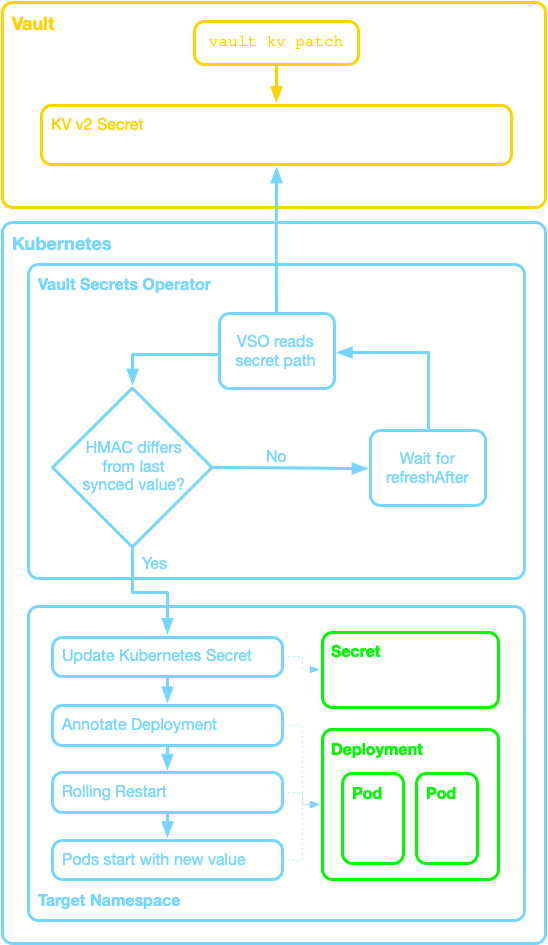
This is what the rolloutRestartTargets array in the VaultStaticSecret configuration is for. It supports triggering a Kubernetes rollout restart of Deployment, DaemonSet, StatefulSet, and argo.Rollout (the last one is very useful if you’re using Argo with the additional Rollouts controller for things like blue-green or canary deployments).
In the configuration below the rolloutRestartTargets lists the Deployment named external-dns, so when VSO detects that the Vault secret has changed it will trigger a rolling restart of the pods in that deployment. I’ve also set hmacSecretData: true. VSO uses a computed HMAC of the secret data to detect changes, and true is already the default, but setting it explicitly means the manifest documents the behaviour it depends on. Without that change detection every poll would look like an update, and the deployment would restart itself every 30 seconds.
apiVersion: secrets.hashicorp.com/v1beta1
kind: VaultStaticSecret
metadata:
  name: external-dns-secret
  namespace: infrastructure
spec:
  type: kv-v2
  mount: kv
  path: clusters/dell7040/infrastructure/external-dns
  destination:
    name: external-dns-secret
    create: true
  refreshAfter: 30s
  rolloutRestartTargets:
    - kind: Deployment
      name: external-dns
  hmacSecretData: true
  vaultAuthRef: external-dns-vault-auth
kubectl rollout restart will replace existing pods gradually, respecting configured parameters such as maxUnavailable and maxSurge. The result is a graceful restart without manual pod deletion or service disruption, assuming the workload is correctly configured. If your target only consists of a single pod, the application will be unavailable while the pod restarts.Testing the rotation#
Before rotating anything, the deployment has a single pod that has been running for 13 minutes.
kubectl get deployments.apps external-dns
NAME           READY   UP-TO-DATE   AVAILABLE   AGE
external-dns   1/1     1            1           161d

kubectl get pods -l app.kubernetes.io/name=external-dns
NAME                            READY   STATUS    RESTARTS   AGE
external-dns-7b59fc9cb4-jmkn6   1/1     Running   0          13m
Updating the value in Vault takes a single command. I’ve left the metadata output in below because the created_time gives me something to measure the restart against.
vault kv patch kv/clusters/dell7040/infrastructure/external-dns CF_API_Key="my-new-secret-api-key"
==================== Secret Path ====================
kv/data/clusters/dell7040/infrastructure/external-dns

======= Metadata =======
Key                Value
---                -----
created_time       2026-07-28T15:36:56.233574696Z
custom_metadata    <nil>
deletion_time      n/a
destroyed          false
version            2
Describing the VaultStaticSecret and the Deployment shows the restart triggered eleven seconds after the write, comfortably inside the 30 second polling window.
kubectl describe vaultstaticsecrets.secrets.hashicorp.com external-dns-secret | \
  grep -A 1 -B 1 "Rollout restart triggered"

    Last Transition Time:  2026-07-28T15:37:07Z
    Message:               Rollout restart triggered
    Observed Generation:   3

kubectl describe deployment external-dns | grep restartedAt

  Annotations:      vso.secrets.hashicorp.com/restartedAt: 2026-07-28T15:37:07Z
Controlling rotation behaviour#
Two settings change how all of the above behaves, and both are worth thinking about before you copy the manifest above into thirty other namespaces.
refreshAfter is the polling interval, and 30 seconds is aggressive for anything other than a demonstration. Load on your Vault server scales with the number of resources multiplied by the frequency, so a 10 second refresh across 200 secrets is 20 requests per second against Vault, forever, in exchange for quickly detecting a change you might make twice a year. I use 300+ seconds for most things and reserve anything shorter for when I am actively testing.
spec.version (kv-v2 only) pins the secret to a specific version, so writing a new value in Vault has no effect on the Kubernetes Secret until you edit the resource. It is worth understanding what pinning does to everything else on this page. VSO carries on polling on the refreshAfter schedule and re-reads that same pinned version every time, and because a kv-v2 version is immutable once written, every read returns identical data, the HMAC comparison sees no change, and no restart is triggered. Pinning turns your polling interval into a health check rather than an update mechanism.
That is a reasonable pattern if you want the version number to live in Git and promotion to be a commit rather than a Vault write, though it does invert the usual model where Vault is the source of truth and VSO follows it.
Conclusion#
Moving KV data into Vault and syncing it with VaultStaticSecret puts you in a better position than managing Kubernetes Secret objects by hand. The value is stored and managed centrally, Vault policy decides which application identity is allowed to fetch it, and rolloutRestartTargets means a rotation reaches the running workload without anybody having to remember to restart a deployment afterwards.
One thing to be clear about is what the Vault policy is doing here. It governs which secrets VSO is permitted to fetch and sync, not who can read the result. Once the value lands in a Kubernetes Secret then standard RBAC applies, and anyone with read access in that namespace can read the token. Both controls are in play, and the Vault side does not replace the Kubernetes side.
What none of this addresses is the point I raised at the start of the first post, which is limiting the time a secret is valid and the scope of what it can do. A static secret stays valid until somebody replaces it, and it carries whatever permissions were attached when it was issued. Everything downstream of that replacement is automated now, which is worth having, but the chain sits idle until a human decides it is time. If you are running static secrets you still need to plan rotation as an operational task with an owner and a schedule, and treat refreshAfter and rolloutRestartTargets as the machinery that makes a rotation land cleanly rather than as the rotation itself.
In the next post I will look at dynamic secrets in Kubernetes, where Vault generates the credential, issues a lease, and revokes it when that lease expires. Credentials become short-lived by default, a leaked one is only useful for the remainder of its TTL, and the rotation you have been scheduling by hand is configured once and then left alone.