

I run ArgoCD or Flux on my Kubernetes clusters to manage everything with GitOps - every configuration is committed to Git before being applied to the cluster by Argo/Flux. Secrets don’t fit that model quite so neatly, and this post is about how I’m using HashiCorp Vault, and specifically the Vault Secrets Operator (VSO), to bring them into it.
Previously I’ve used sealed-secrets and kubeseal to encrypt my Kubernetes secrets before committing them to Git - that way Flux or ArgoCD can manage those secrets as code without the secrets being publicly readable - once they’re encrypted they are safe to commit to a public repository.
That works fine, but there are some operational considerations to that method - for example, you need to back up the private key on your sealed-secrets deployment, if you lose it for any reason you would need to re-encrypt all of your secrets config. The process for encrypting the sealed-secret is also a bit of a pain - you first need to create the kubernetes secret (e.g. kubectl create secret... --dry-run -o yaml) and then use the kubeseal command to encrypt it. To use kubeseal you either need access to the Kubernetes server and the sealed-secrets deployment directly, or a copy of the encryption key. Scaling that process requires some thought. And if you’re looking at multiple Kubernetes servers - you need to manage multiple encryption keys or ensure access to multiple sealed-secrets deployments.
sealed-secrets solves the GitOps config storage problem (though it introduces a bit of operational overhead), however - there are other issues to solve as well - like secret rotation or dynamic credentials. The principle is to reduce the time a secret is valid - should a secret be compromised then the impact is time-limited. It also doesn’t help you limit scope, where each secret is scoped only with the permissions needed for the operation. In an ideal world you limit both the blast radius and effective time of a compromised secret.
By default, Kubernetes stores Secret objects in etcd as base64-encoded strings, which is an encoding scheme rather than encryption - if you gain read access to etcd, decoding those values takes a single command. In a default cluster installation that access is often less restricted than you might hope, since etcd typically binds to a port that any node with the right certificates can reach. The consequence to this is that a compromised control plane node, a misconfigured backup process, or an etcd snapshot sent off to an S3 bucket without careful access controls can expose every credential, token, and API key in your cluster in a single operation.
In this post (and probably a series of posts), I’ll explore the how and why of using HashiCorp Vault to solve some of these problems.
Vault Secrets Operator (VSO)#
The Vault Secrets Operator (VSO) is a Kubernetes operator that is designed to safely and securely get your secrets from Vault to your applications running in Kubernetes using a set of Custom Resource Definitions. The secrets can then be used as standard Kubernetes Secrets, or as ephemeral volumes using the Container Storage Interface (CSI) driver.
VSO authenticates to your Vault instance to retrieve secrets, in this post I will show how to use the Kubernetes Auth engine to authenticate with Vault and retrieve secrets for your application.
- Each application will run under its own identity (
Namespace/ServiceAccount) - Each identity is tied to its own
Rolein Vault - Each
Rolehas one or morePolicythat defines its access to secrets
Configured like this, each application running in Kubernetes will have access to its own secrets, but not its neighbours.
Configuring VSO with Kubernetes Auth#
VSO is deployed using a Helm chart and is customisable using Helm configuration values, either on the command line or by using a values YAML file. Since I am already operating by GitOps principles I use Argo or Flux to deploy the Helm chart with a values file.
The configuration below:
- creates a default
VaultConnection - configures client cache encryption which ensures that any authentication tokens cached by VSO (e.g. the Service Account tokens used to access Vault) are encrypted before being written to etcd
# vso-values.yaml
defaultVaultConnection:
  enabled: true
  address: "http://vault.lab.definit.co.uk"
  skipTLSVerify: false
controller:
  manager:
    clientCache:
      persistenceModel: direct-encrypted
      storageEncryption:
        enabled: true
        mount: mac-cluster
        keyName: vso-client-cache
        transitMount: transit-mount
        namespace: vault-secrets-operator
        kubernetes:
          role: auth-role-operator
          serviceAccount: vault-secrets-operator-controller-manager
          tokenAudiences: ["vault"]
# Install VSO using the values file
helm repo add hashicorp https://helm.releases.hashicorp.com
helm install --version 1.4.0 --create-namespace \
--namespace vault-secrets-operator \
vault-secrets-operator hashicorp/vault-secrets-operator -f vso-values.yamlConfiguring Vault for VSO Client Cache Encryption#
VSO caches Vault client sessions (the auth tokens it uses to talk to Vault) in Kubernetes Secret objects so they survive controller restarts, which means those cached tokens land in etcd just like any other secret. Setting persistenceModel: direct-encrypted tells VSO to encrypt that cache via the Vault Transit Secrets Engine before writing it, so a raw dump of etcd secrets doesn’t hand over live Vault tokens along with everything else. Leave storageEncryption.enabled unset and the cache is either not persisted at all or stored in plaintext, both worse options than encrypting it.
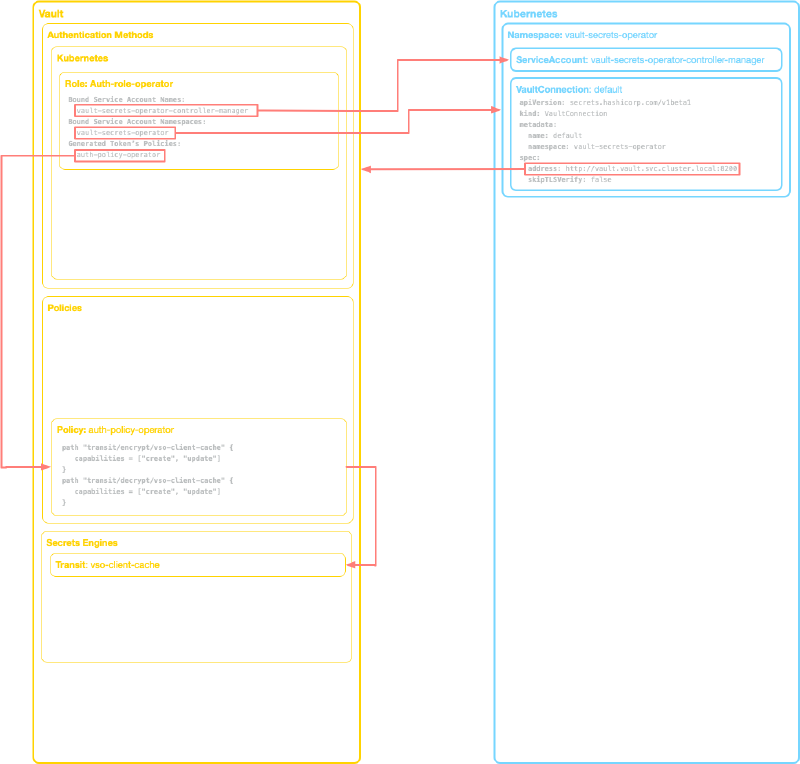
That encryption depends on the Kubernetes Auth engine and the Transit Secrets Engine both being enabled in Vault. VSO authenticates under its own Kubernetes service account (vault-secrets-operator-controller-manager in the vault-secrets-operator namespace), and a role (auth/kubernetes/role/auth-role-operator) binds that identity to a policy granting access to the Transit engine’s vso-client-cache key, which is what’s actually used to encrypt and decrypt the cache. VSO creates this VaultAuth itself from the Helm configuration, separate from any VaultAuth resources you define for your own applications.
# Enable and configure Kubernetes auth
vault auth enable kubernetes

vault write auth/kubernetes/config \
  kubernetes_host="https://kubernetes.default.svc.cluster.local:443"

# Enable Transit Secrets Engine
vault secrets enable transit

# Create the VSO transit engine for client cache
vault write -f transit/keys/vso-client-cache

# Create the VSO auth policy
vault policy write auth-policy-operator - <<EOF
path "transit/encrypt/vso-client-cache" {
  capabilities = ["create", "update"]
}
path "transit/decrypt/vso-client-cache" {
  capabilities = ["create", "update"]
}
EOF

# Create the VSO auth role
vault write auth/kubernetes/role/auth-role-operator \
  bound_service_account_names=vault-secrets-operator-controller-manager \
  bound_service_account_namespaces=vault-secrets-operator \
  audience=vault \
  token_policies=auth-policy-operator \
  token_period=2m \
  alias_name_source=serviceaccount_uid
Now VSO can make a request to Vault, using its own Kubernetes service account, and will be assigned a token that has rights to encrypt and decrypt using the Transit engine, and nothing else - no access to any other secrets in Vault.
Using a Static Secret#
As a real-world example, I use cert-manager in my Kubernetes cluster to issue TLS certificates, for DNS validation I need an API key for Cloudflare (my DNS provider) to be available as a Secret. cert-manager is deployed in the infrastructure namespace and runs using the cert-manager service account.
I begin by creating my secret in Vault in the Key Value (KV) Secrets Engine:
vault kv put kv/clusters/dell7040/infrastructure/cert-manager api-token="my-cloudflare-token"I created a Kubernetes Auth role called dell7040-cert-manager which is bound to the Namespace and ServiceAccount name (infrastructure/cert-manager). That role is assigned a Vault Policy which provides access to the KV Secrets Engine at a specific path, with permissions to read the KV Secrets on the specified path.
# Create the cert-manager auth policy
vault policy write dell7040-cert-manager - <<EOF
path "kv/data/clusters/dell7040/infrastructure/cert-manager" {
  capabilities = ["read"]
}
path "kv/metadata/clusters/dell7040/infrastructure/cert-manager" {
  capabilities = ["read", "list"]
}
EOF

# Create the cert-manager auth role
vault write auth/kubernetes/role/dell7040-cert-manager \
  bound_service_account_names=cert-manager \
  bound_service_account_namespaces=infrastructure \
  audience=vault \
  token_policies=dell7040-cert-manager \
  alias_name_source=serviceaccount_uid
In Kubernetes, I create a VaultAuth custom resource in the infrastructure Namespace that uses the default VaultConnection to connect to Vault, but specifies that the connection should use the infrastructure/cert-manager ServiceAccount identity and the dell7040-cert-manager role. In response, after validating the identity with Kubernetes, Vault issues a new token based on the Role and Policy.
apiVersion: secrets.hashicorp.com/v1beta1
kind: VaultAuth
metadata:
  name: cert-manager-vault-auth
  namespace: infrastructure
spec:
  kubernetes:
    role: dell7040-cert-manager
    serviceAccount: cert-manager
    audiences:
     - "vault"
  vaultConnectionRef: vault-secrets-operator/default
  method: kubernetes
  mount: kubernetes
The last piece of the puzzle (at least for a static secret!) is the VaultStaticSecret custom resource. This tells VSO to use the VaultAuth to mount the specified path as a Kubernetes Secret.
apiVersion: secrets.hashicorp.com/v1beta1
kind: VaultStaticSecret
metadata:
  name: cloudflare-api-token-secret
  namespace: infrastructure
spec:
  type: kv-v2
  mount: kv
  path: clusters/dell7040/infrastructure/cert-manager
  destination:
    name: cloudflare-api-token-secret
    create: true
  refreshAfter: 300s
  vaultAuthRef: cert-manager-vault-auth
And the result is the secret created:
kubectl get secret -n infrastructure cloudflare-api-token-secret
NAME                          TYPE     DATA   AGE
cloudflare-api-token-secret   Opaque   2      26d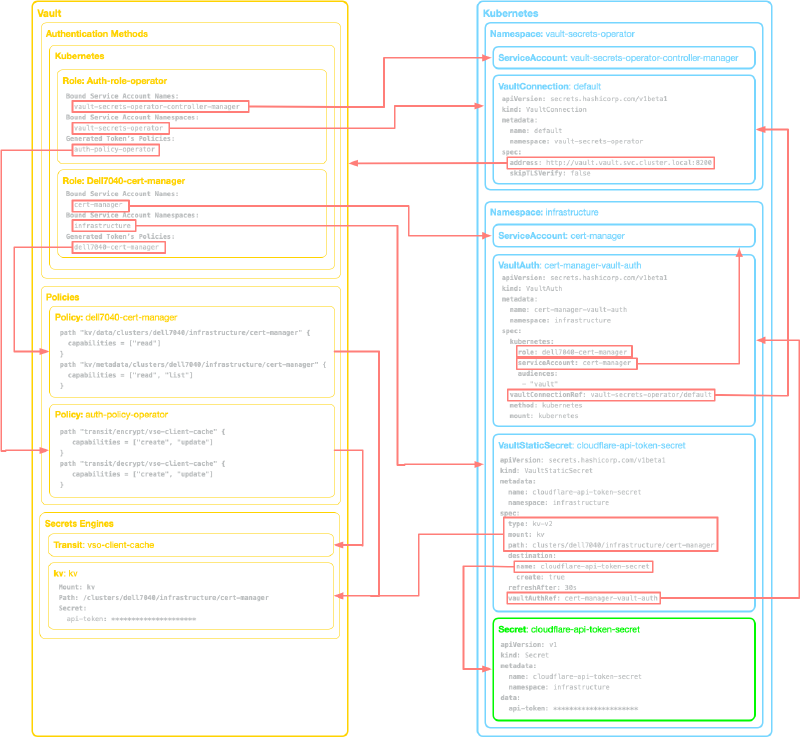
Conclusion#
What this setup gives me, at its core, is an identity chain rather than a single shared secret: each application runs under its own Kubernetes identity, Kubernetes validates that identity first, and only then does Vault tie it to a Role and the Policy that defines exactly which secrets it can read. Compromise one application’s service account and you’ve compromised access to that application’s secrets, not the keys to everything else running in the cluster.
Managing static secrets for a single Kubernetes cluster is a reasonable place to start, but it only scratches the surface. Next I’m going to look at managing multiple Kubernetes clusters, secret rotation, dynamic secrets and database credentials, and the operational side of things: metrics, logging, and how VSO compares to alternatives like the External Secrets Operator.