

Static secrets have a fundamental problem: once they exist, they exist forever, sitting in a config file or a Kubernetes secret with the same value until someone remembers to rotate them, which in practice is rarely often enough. Vault’s dynamic secrets engines flip that model entirely. Instead of storing a credential and hoping it stays safe, Vault generates one on demand, scoped to exactly what’s asking for it, with a lease that determines how long it’s valid before Vault revokes it automatically. It doesn’t matter whether you’re talking about database credentials, AWS IAM keys, or a certificate from the PKI engine, the pattern is the same, nothing sits around waiting to be leaked, copied, or forgotten about in an old deployment manifest. That’s the real shift dynamic secrets bring: security stops depending on someone remembering to rotate a password, and starts being enforced by the system itself.
Common dynamic secrets engines:
- Database - generates short-lived credentials for databases on demand:
- AWS - generates IAM credentials or STS tokens:
- PKI - issues X.509 certificates:
- SSH - signs SSH public keys or generates OTP credentials:
- RabbitMQ - generates vhost-scoped credentials:
- Kubernetes - generates short-lived ServiceAccount tokens:
- Azure - generates service principal credentials:
To make this concrete, let’s look at how it works with Vault’s database secrets engine.
Vault Database Secrets Engine#
Vault’s database secrets engine solves a problem most of us have lived with for too long: static database credentials sitting in a config file somewhere, valid forever, shared between every service that needs them. Instead of that, you configure Vault with a connection to your database (Postgres, MySQL, whatever you’re running) and a set of roles that define what a generated user can do, and Vault creates a brand new credential on demand each time something requests one, with a lease attached that determines how long it lives before Vault revokes it automatically. The application never sees a long-lived password, it authenticates to Vault, gets a short-lived credential scoped to exactly what it needs, and Vault handles the cleanup - if a lease isn’t renewed, the underlying database user gets dropped.
Configuring Postgres#
Protecting your Postgres passwords#
Postgres uses MD5 hashing by default to store passwords, which is weak, vulnerable, and can undermine the value of short-lived dynamic credentials (which are only valuable if the time it takes to crack them is less than their lifespan). Switching to SCRAM-SHA-256 means cracking the short-lived password is not feasible.
ALTER SYSTEM SET password_encryption = 'scram-sha-256';
SELECT pg_reload_conf();
SET password_encryption = 'scram-sha-256'; scram-sha-256 you need to restart your PostgreSQL server.Configuring Vault#
Configuring Vault access to Postgres#
Next we need to configure a user for Vault to use to access Postgres - it’s initially created with a temporary password that is only used to set up the connection before being rotated to something secure, that only Vault will ever know.
CREATE ROLE vault_root WITH LOGIN PASSWORD 'temp_vault_password' CREATEROLE VALID UNTIL 'infinity';
GRANT ALL PRIVILEGES ON DATABASE postgres TO vault_admin;
Enable and configure the Vault Database Secrets Engine#
The next step is to enable the database engine and configure it to talk to Postgres using the credentials we just created.
# Enable the Database Secrets Engine
vault secrets enable database

# Configure the initial connection
vault write database/config/app-db \
  plugin_name=postgresql-database-plugin \
  connection_url="postgresql://{{username}}:{{password}}@192.168.1.30:5432/postgres?sslmode=disable" \
  username="vault_root" \
  allowed_roles="app-readonly,app-readwrite" \
  password="temp_vault_password" \
  password_authentication="scram-sha-256"
Success! Data written to: database/config/app-db

# Rotate the vault_admin password
vault write -force database/rotate-root/app-db
The allowed_roles value is really important and requires planning - you can use a wildcard value * or glob patterns app-db-*, but those need to be used carefully as they could potentially allow someone to gain more permissions than you want. In this case I’ve allowed two roles, app-readonly and app-readwrite, which are defined below.
allowed_roles (or any connection settings) you need to re-perform the full vault write database/config/app-db — the write is a full replace, not a patch. Fields you omit get reset to their defaults, so you must re-supply everything, including a valid password for vault_root. If you have already rotated the root password, you will need another admin account to reset vault_root to a known value first.Creating Roles for your app#
Create the roles defined in the allowed_roles configuration, ensuring the db_name matches the name when you created the path (e.g. I created the connection using database/config/app-db so the db_name is app-db.
The creation statement and revocation statement are used when creating and revoking the database role.
# Create a read-only role for app-db
vault write database/roles/app-readonly \
  db_name=app-db \
  creation_statements="CREATE ROLE \"{{name}}\" WITH LOGIN PASSWORD '{{password}}' VALID UNTIL '{{expiration}}'; GRANT SELECT ON ALL TABLES IN SCHEMA public TO \"{{name}}\";" \
  revocation_statements="REVOKE ALL PRIVILEGES ON ALL TABLES IN SCHEMA public FROM \"{{name}}\"; DROP ROLE IF EXISTS \"{{name}}\";" \
  default_ttl="1h" \
  max_ttl="3h"

# Create a read-write role for app-db
vault write database/roles/app-readwrite \
  db_name=app-db \
  creation_statements="CREATE ROLE \"{{name}}\" WITH LOGIN PASSWORD '{{password}}' VALID UNTIL '{{expiration}}'; GRANT SELECT, INSERT, UPDATE, DELETE ON ALL TABLES IN SCHEMA public TO \"{{name}}\";" \
  revocation_statements="REVOKE ALL PRIVILEGES ON ALL TABLES IN SCHEMA public FROM \"{{name}}\"; DROP ROLE IF EXISTS \"{{name}}\";" \
  default_ttl="1h" \
  max_ttl="3h"
Now you can test the new roles work and provide the credentials by reading from Vault:
vault read database/creds/app-readonly

Key                Value
---                -----
lease_id           database/creds/app-readonly/Nk9a2jniR8BELcAGXJOKv0dq
lease_duration     1h
lease_renewable    true
password           GnFfWC4KGsjGdvrsqfN-
username           v-root-app-read-SNZm2f9nEaIZeOTNfSha-1785410230

vault read database/creds/app-db-readwrite

Key                Value
---                -----
lease_id           database/creds/app-readwrite/xyb4BWtGLwmsk5UauxKMoej0
lease_duration     1h
lease_renewable    true
password           SCxpglg90B-bMOCLttTS
username           v-root-app-read-gc5d0qKZwpAs2BmHKI68-178541031
Configure Vault Policy and Roles#
Similarly to the Static Secrets engine with Kubernetes, we need to configure Vault Roles and Policies to allow the Kubernetes Service Account access to those two credentials. Firstly, we create a Vault Policy for the paths to the credentials, and allow the read capability. To bind the Kubernetes Service account to the Vault Policy, we create the Vault Role.
vault policy write  dell7040-app-db-readonly - <<EOF
path "database/creds/app-readonly" {
  capabilities = ["read"]
}
EOF

vault policy write  dell7040-app-db-readwrite - <<EOF
path "database/creds/app-readwrite" {
  capabilities = ["read"]
}
EOF
vault write auth/kubernetes/role/dell7040-app-db \
bound_service_account_names=app-db \
bound_service_account_namespaces=infrastructure \
audience=vault \
token_policies=dell7040-app-db-readonly,dell7040-app-db-readwrite \
alias_name_source=serviceaccount_uidConfiguring Kubernetes#
From the Kubernetes side it’s again similar to the Static Secret configuration in my previous post - if you want to follow along with this example but you haven’t configured the Vault Secrets Operator (VSO) deployment you’ll need to go there and complete those initial steps.
VaultAuth#
The VaultAuth tells Vault Secrets Operator to use the correct Service Account (app-db) and which Vault Role to use (dell7040-app-db).
apiVersion: secrets.hashicorp.com/v1beta1
kind: VaultAuth
metadata:
  name: app-db-vault-auth
  namespace: infrastructure
spec:
  kubernetes:
    role: dell7040-app-db
    serviceAccount: app-db
    audiences:
     - "vault"
  vaultConnectionRef: vault-secrets-operator/default
  method: kubernetes
  mount: kubernetes
Retrieving a Vault Dynamic Secret#
Now we finally come to requesting the dynamic credentials in Kubernetes! The VaultDynamicSecret works in a similar way to the VaultStaticSecret, specifying the mount and path, where to create the secret and the restart targets. The difference is the renewal time, and what to do when the VaultDynamicSecret is deleted.
apiVersion: secrets.hashicorp.com/v1beta1
kind: VaultDynamicSecret
metadata:
  name: app-db-readonly-credentials
  namespace: infrastructure
spec:
  # Mount the secrets backend
  mount: database
  # Path to the secret needed
  path: creds/app-readonly
  # Where to store the secrets, VSO will create the secret
  destination:
    create: true
    name: app-db-readonly-credentials
  # Renew the lease at 67% of the TTL
  renewalPercent: 67
  # Revoke the lease if the resource is deleted
  revoke: true
  # Restarting workloads on rotation
  rolloutRestartTargets:
  - kind: Deployment
    name: myapp
  # Name of the VaultAuth to use
vaultAuthRef: infrastructure/app-db-vault-authapiVersion: secrets.hashicorp.com/v1beta1
kind: VaultDynamicSecret
metadata:
name: app-db-readwrite-credentials
namespace: infrastructure
spec:
# Mount the secrets backend
mount: database
# Path to the secret needed
path: creds/app-readwrite
# Where to store the secrets, VSO will create the secret
destination:
create: true
name: app-db-readwrite-credentials
# Renew the lease at 67% of the TTL
renewalPercent: 67
# Revoke the lease if the resource is deleted
revoke: true
# Restarting workloads on rotation
rolloutRestartTargets:
- kind: Deployment
name: myapp
# Name of the VaultAuth to use
vaultAuthRef: infrastructure/app-db-vault-authRotating Dynamic Secrets#
With VSO you don’t rotate dynamic credentials directly. You configure the lease lifecycle and VSO does the rotation as a side effect of the lease expiring.
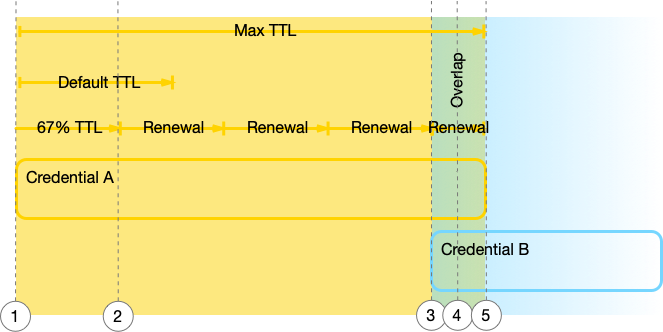
VaultDynamicSecretreadsdatabase/creds/app-db-readonlyonce, gets a credential (Credential A) and a lease, and writes it to a Kubernetes Secret- At
renewalPercentof the leasedefault_ttl(default 67%) it renews the lease - It keeps renewing until the
max_ttlis hit (the final renewal will be for the remaining time untilmax_ttl, which may be less than thedefault_ttl), This triggers VSO to do a fresh read, gets a new username and password (Credential B) and update the Kubernetes Secret. - In this overlap both Credential A and Credential B are valid. VSO triggers any rollout targets to restart the pods using the updated Kubernetes Secret (Credential B)
- Credential A expires and Credential B is in use
If we take an example of max_ttl=3h, default_ttl=1h, renewalPercent=67, that translates to the following timeline:
| Time | Event |
|---|---|
| 0m | Vault issues Credential A. Would expire at t=60m if untouched |
| 40m | Renewal 1 - 67% of default_ttl reached. New expiry t=100m |
| 80m | Renewal 2 - 67% of default_ttl reached. New expiry t=140m |
| 120m | Renewal 3 - 67% of default_ttl reached. New expiry t=180m |
| 160m | Renewal 4 - 67% of default_ttl reached. Only 20 min remain before max_ttl (t=180m), less than a full default_ttl cycle, so VSO can’t renew again. |
| 160m | Vault issues Credential B, both Credential A and B are valid. VSO starts a rolling restart of the rolloutRestartTargets pods |
| 180m | max_ttl reached. Vault revokes Credential A, drops the Postgres role |
kubectl annotate vaultdynamicsecret app-db-readonly -n myapp vso.secrets.hashicorp.com/force-sync="$(date +%s)" --overwriteSetting revoke: true revokes the credential lease immediately when the VaultDynamicSecret resource is deleted, rather than allowing it to expire. It’s worth noting that this needs the VaultAuth role referenced by the VaultDynamicSecret to have update permission on sys/leases/revoke in its Vault policy, otherwise the revoke call will fail even with the field set to true.
Testing the configuration#
First I check that the VaultDynamicSecret exists, and is in a ready=true state:
kubectl get vaultdynamicsecrets.secrets.hashicorp.com
NAME                          SYNCED   HEALTHY   READY   AGE
app-db-readonly-credentials   True     True      True    25d
app-db-readwrite-credentials  True     True      True    16m
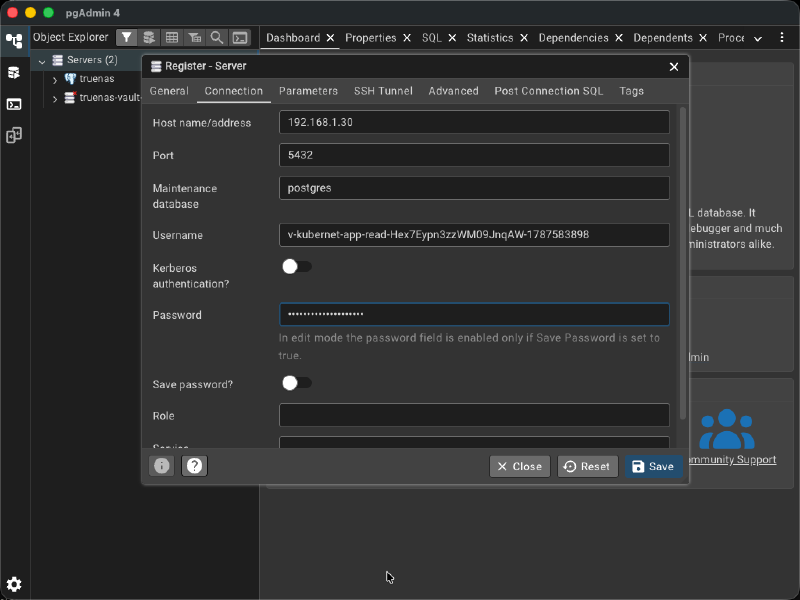
Next I grab the value from the created Kubernetes Secret and use base64 to decode it:
kubectl get secret app-db-readonly-credentials -o jsonpath='{.data.username}' | base64 -d
v-kubernet-app-read-Hex7Eypn3zzWM09JnqAW-1787583898

kubectl get secret app-db-readonly-credentials -o jsonpath='{.data.password}' | base64 -d
I4cEkTInMkWZ2nt-id3t
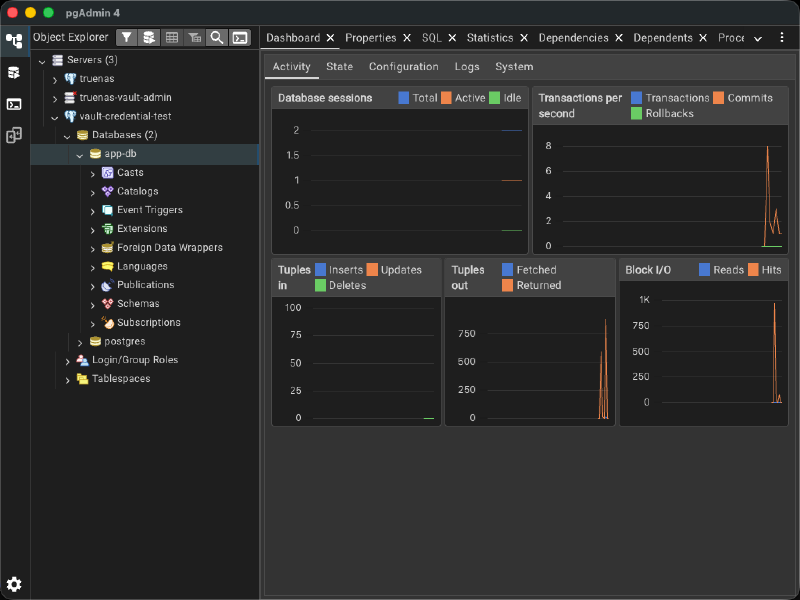
Once I have the generated username and password, I can test them in a client such as pgAdmin 4:
Conclusion#
Dynamic database secrets change the emphasis for credential management from something you have to remember to do, to something the system does for you by design. But there’s a second shift happening underneath that, one that’s easy to miss: you can’t stand up a dynamic secret without first deciding what it’s actually allowed to do. A static credential tends to accumulate permissions over time, someone needs one more grant, it gets added to the same shared user, and eventually you’ve got a password that can do far more than any single consumer actually needs. Vault’s database engine forces the opposite workflow, you define a role with a specific creation statement before anything gets issued, so the credential a service receives is scoped to exactly what that role permits, nothing more. That upfront thinking is deliberate friction, and it’s worth it, it moves you away from blanket credentials handed out because they were convenient, toward access that’s been reasoned about in advance. Pair that with VSO on Kubernetes and the whole lifecycle, renewal, rotation, overlap between old and new credentials, cleanup on deletion, runs without a human in the loop. The result is a database that never has to trust a password longer than it strictly needs to, and never has to trust one with more reach than it was ever meant to have.