Sam has been working in the IT industry for nearly 20 years now, and is currently working for VMware as a Senior Technical Marketing Manger in the Cloud Management Business Unit (CMBU) focussed on Automation. Previously, he has worked as consultant for VMware PSO, specializing in cloud automation and network virtualization. His technical experience includes design, development and implementation of cloud solutions, network function virtualisation and the software defined datacentre. Sam specialises in automation of network virtualisation for cloud infrastructure, enabling public cloud solutions for service providers and private or hybrid cloud solutions for the enterprise.
Sam holds multiple high level industry certifications, including the VMware Certified Design Expert (VCDX) for Cloud Management and Automation. He is also a proud member of the vExpert community, holding the vExpert accolade from 2013-present, as well as being selected for the vExpert NSX, vExpert VSAN and vExpert Cloud sub-programs.
I am absolutely thrilled to announce that I’ve been awarded vExpert 2013 - it’s such an honour to be listed among these others and hopefully I can continue to contribute throughout the year. I am looking forward to getting stuck in to the vExpert programme.
In other news, one of DefinIT’s contributing authors @SimonEady is a finalist for the VMware V.I.T. Competition and needs your votes!y I can continue making a contribution to the VMware community for the coming year. I’m looking forward to getting stuck in to the programme!
It’s no secret that installing certificates from an internal CA is a pain in the…vCenter, but having just gone through the process of updating 3 vCenter installations with the 5-7 certificates required for each server I was asked “just why is it we need to do this again?”
Why does it require multiple certificates for my vCenter server?
In short, each service requires a certificate because it could feasibly be on a server (or servers) of it’s own - take this hypothetical design - each role is hosted on it’s own VM, and there are 7 certificates required - SSO, Inventory Service, vCenter Server, Orchestrator, Web Client, Log Browser and Update Manager. If you install all these services on one server you still have to create certificates for those individual services.
A problem reared it’s head over the weekend with one of our hosts’ Fibre Channel HBAs negotiating it’s way down to 2GB, and consequently introducing massive latency for the LUNs behind it. Analysis showed that the drivers for the HBA were over a year out of date so the suggested fix from VMware was to update the drivers. This is fine to do manually for a few hosts, but would be a real pain for the 300+ hosts in the environment I manage.
Updating vCenter Server certificates has always been a pain - it has only got worse with the sheer number of services that are running under vSphere 5.1 - each service requiring a unique certificate and to be installed in many complex steps.
Fortunately , with the release of the SSL Certificate Automation Tool, VMware have gone some way to reducing the headache.
I’ve previously posted around this topic
as part of another problem but having had to figure out the process again I think it’s worth re-posting a proper script for this. VMware KB 1016106 is snappily titled “ESXi/ESX hosts with visibility to RDM LUNs being used by MSCS nodes with RDMs may take a long time to boot or during LUN rescan” and describes the situation where booting ESXi (5.1 in my case) takes a huge amount of time to boot because it’s attempting to gain a SCSI reservation on an RDM disk used by MS Clustering Services. It also details the fix.
This article originally started off life as a record of how I managed to get this working, as a lot of my posts do, but this time it appears I am foiled.
Last week, I had 3 vCenter Servers that appeared to be happily talking to each other in Linked Mode sharing a singe Multi-site SSO domain without any real issues. I had a single-pane-of-glass view of all 3 and I could manage them all from the one client. The reason for the 3 vCenter servers was segregation of LAN and DMZ networks: vCenter001 was in the LAN, vCenter002 sat in DMZ1 and vCenter003 sat in DMZ2.
Had a strange one after deploying an XP VM from a template today - the VM would not power on and threw the following error:
An error was received from the ESX host while powering on VM [VM name].
cpuid.coresPerSocket must be a number between 1 and 8
Digging around on google the error seemed to be related to over-allocating vCPUs (e.g. assigning 8 vCPUs on a VM with 4 physical CPU cores). This was a single vCPU machine on a 12 processor host, so not likely to be that! It did give me the idea that maybe the VMX had an error, so I edited the VM hardware and added an extra CPU and saved the config. I then edited it back to a single CPU and powered on the machine - it worked!
So VMware’s Support Assistant is pretty awesome and it’s free! I thought I’d do a quick run through of the installation and set up for anyone who was interested, it’s fairly straightforward and if you raise a lot of calls or have multiple calls on the go it’s a time saver!
I’m very pleased to say that as of 21st December, I passed my VCP510 exam and am now VCP5 qualified! It’s something that I’ve wanted to do for a long time (since VCP3) but have never been able to get funding for the required course. My current employer sent me on the vSphere 5 Fast Track course earlier this year, so I was all set to take the exam.
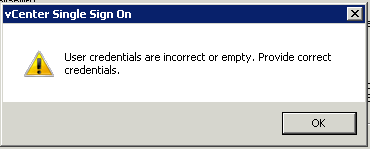
While adding an additional vCenter Server to our Multi-Site Single Sign On instance I encountered a problem as I entered the details of the existing SSO.
The error thrown was:
User credentials are incorrect or empty. Provide correct credentials.
After a couple of hours online with VMware support I took a guess at the problem. On the existing Single Sign On Configuration I have added the Active Directory domain DefinIT and in order to enable integrated authentication from the vSphere Client I moved it to the top of the list - this meant that System-Domain is no longer the default authentication domain. The SSO admin account (admin@System-Domain) is a part of that domain and so my guess is that the installer tries to authenticate using [email protected]rather than System-Domain, which of course failed.


 It’s no secret that installing certificates from an internal CA is a pain in the…vCenter, but having just gone through the process of updating 3 vCenter installations with the 5-7 certificates required for each server I was asked “just why is it we need to do this again?”
 A problem reared it’s head over the weekend with one of our hosts’ Fibre Channel HBAs negotiating it’s way down to 2GB, and consequently introducing massive latency for the LUNs behind it. Analysis showed that the drivers for the HBA were over a year out of date so the suggested fix from VMware was to update the drivers. This is fine to do manually for a few hosts, but would be a real pain for the 300+ hosts in the environment I manage.