Sam has been working in the IT industry for nearly 20 years now, and is currently working for VMware as a Senior Technical Marketing Manger in the Cloud Management Business Unit (CMBU) focussed on Automation. Previously, he has worked as consultant for VMware PSO, specializing in cloud automation and network virtualization. His technical experience includes design, development and implementation of cloud solutions, network function virtualisation and the software defined datacentre. Sam specialises in automation of network virtualisation for cloud infrastructure, enabling public cloud solutions for service providers and private or hybrid cloud solutions for the enterprise.
Sam holds multiple high level industry certifications, including the VMware Certified Design Expert (VCDX) for Cloud Management and Automation. He is also a proud member of the vExpert community, holding the vExpert accolade from 2013-present, as well as being selected for the vExpert NSX, vExpert VSAN and vExpert Cloud sub-programs.
Recently I needed to report on the ActiveSync devices that were attached to our Exchange 2010 organisation, and which users they were accessing, and then export them to a CSV file.
This is the script:
Walking through the script it gets all the mailboxes from the server MBX01, gets an object containing the ActiveSync device name, type and user agent. It then adds a property to that object called “MailboxIdentity” and adds it to that object. That object is then added to an array of objects called ActiveSyncDevices, which is then exported to CSV.
For years I have preached to users about the importance of strong passwords, regular password changes and non-proliferation of the same password, yet I’ve fallen foul of 2 of my own rules. My password is strong - 13 characters, random alpha-numeric, upper and lower case and including special characters - but has been re-used in a few places, and hasn’t been changed in a (long) while.
Getting a SCOM 2007 R2 SCOM agent on TMG is a useful way of monitoring TMG, especially with the SCOM TMG Management Pack – it’s not exactly “out-of-the-box” functionality though, with many sources I’ve read simply stating that it can’t be done. There are some half-working solutions I’ve seen, but nothing that worked for me.
The process involves simply opening the correct ports and protocols between the TMG servers and the SCOM management servers, which after a few attempts watching the live logs, I found.
SCOM 2007 R2’s Audit Collection Services (ACS from now on) is very useful for meeting compliance (e.g. Sarbanes Oxley) and security audit requirements – working with financial companies often requires such compliance. It’s pretty simple to install in a domain environment – you run the installer to create a collection server, then activate the forwarder on the client servers.
When it comes to servers you really want to audit, those that are by definition more at risk from security breach because they are publicly accessible, it’s not so straightforward. Take for example that web server, or FTP host in your DMZ, certainly not domain joined and probably bombarded by daily brute force password attacks. Select the SCOM agent in the console and enable Audit Collection Services?
Today I was configuring a new FTP server based on IIS7 (well, 7.5 technically as it’s a Server 2008 R2 host), and I wanted an easy way to add and remove allowed IP addresses based on either an XML config file or a CSV import. Customers’ IP addresses are added or removed regularly, but I didn’t want to have to update their details twice, once on the server and once in the documents.
Recently I had cause to configure iSCSI multipathing on a test ESXi server. The production environment servers use iSCSI HBAs to connect to the back end storage, so multipathing them is a straight-forward setup.
It’s good practice to separate VMotion, virtual machine and iSCSI traffic, it also helps you manage those logical and physical connections.
Connect to your ESXi server using the vSphere Client and select the host. Go to the configuration tab and click “Add Networking…”. Select a new VMKernel connection type.
In this post I will be installing a TMG Array as a “back firewall” behind a hardware firewall. The Array will consist of two virtual servers, TMG01 and TMG02 which each have 3 NICs. One NIC will be dedicated to the LAN network, accessible internally. One NIC will be dedicated to the DMZ network, accessible to the outside world on a static mapped IP. The third NIC will be a dedicated intra-array communications NIC as per Microsoft’s recommendation.
vMA is available as a Virtual Appliance (OVF) from VMware. To install it on VMware Workstation 7, open Workstation and select Import or Export to import a new OVF, the URL for the latest OVF for vMA is on the vMA download page
As per this article on virtualkenneth.com, you need to edit the VMX file to change the SCSI card and OS type, otherwise you’ll have a kernel panic on boot.
Wordle.net is a great little site that’s been around for ages – but it gives quite a unique insight into the content of your blog – just shove the RSS feed in and out comes a nice word cloud. I found it interesting to compare this to the Tag cloud generated from how I tagged my posts – for example Exchange is the predominant word in the Wordle.net cloud – but not in the tag cloud. Update and upgrade were some obvious ones, I expected install or installing to feature more heavily. There’s also a random Kevin in there!


 Recently I needed to report on the ActiveSync devices that were attached to our Exchange 2010 organisation, and which users they were accessing, and then export them to a CSV file.
 Getting a SCOM 2007 R2 SCOM agent on TMG is a useful way of monitoring TMG, especially with the SCOM TMG Management Pack – it’s not exactly “out-of-the-box” functionality though, with many sources I’ve read simply stating that it can’t be done. There are some half-working solutions I’ve seen, but nothing that worked for me.
 SCOM 2007 R2’s Audit Collection Services (ACS from now on) is very useful for meeting compliance (e.g. Sarbanes Oxley) and security audit requirements – working with financial companies often requires such compliance. It’s pretty simple to install in a domain environment – you run the installer to create a collection server, then activate the forwarder on the client servers.
 Recently I had cause to configure iSCSI multipathing on a test ESXi server. The production environment servers use iSCSI HBAs to connect to the back end storage, so multipathing them is a straight-forward setup.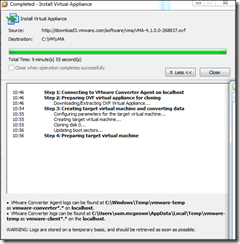
 Hardly seems newsworthy any more, with the Automatic Upgrade option on WordPress 2.7+, but I’ve just upgraded to WordPress 3.0.1