Written by Sam McGeown
on 21/7/2015Note: This falls under the “I don’t think this is supported” category – use this method at your own peril!
As part of some testing I’ve been doing for vRealize Automation DR scenarios, I wanted to test changing the IP address of a HA PSC pair using a script (think SRM failover to a new subnet).
Written by Sam McGeown
on 20/7/2015I’m not sure how supported this is, but this process can recover a vSphere 6 vCenter Server Appliance or Platform Services Controller when you’ve lost the root password.
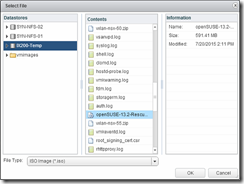
Download the OpenSUSE Rescue CD -
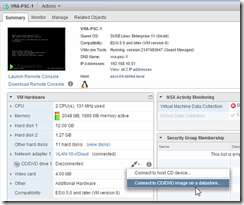
Mount the CD to the PSC Appliance
![]()
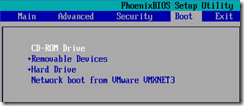
Reboot the appliance and enter the BIOS setup using F2, configure the CD-ROM as first-boot device. Save and exit to reboot into the SUSE Live-CD.
![]()
Written by Sam McGeown
on 8/7/2015The recommendations for the vRealize Appliance have changed with 6.2, the published reference architecture now does not recommend using an external Postgres database (either vPostgres appliance, a 3rd party Postgres deployment or using a third vRealize Appliance as a stand-alone database installation). Instead the recommended layout is shown in the diagram below. One instance of postgres on the primary node becomes an active instance, replicating to the second node which is passive. In front of these a load balancer or DNS entry points to the active node only. Fail-over is still a manual task, but it does provide better protection than a single instance.
Written by Sam McGeown
on 7/7/2015Providing a highly available single sign on for vRealize Automation is a fundamental part of ensuring the availability of the platform. Traditionally, (vCAC) vRA uses the Identity Appliance and relies on vSphere HA to provide the availability of the SSO platform, but in a fully distributed HA environment that’s not really good enough. It’s also possible to use the vSphere 5.5 SSO install in a HA configuration - however, many companies are making the move to the latest version of vSphere and don’t necessarily want to maintain a 5.5 HA SSO instance.
Written by Sam McGeown
on 1/7/2015Having just welcomed VMTurbo on board as a blog sponsor, I thought I’d do a quick posting on how to deploy their free Virtual Health Monitor appliance.
Sign up for a free license here and download the appropriate version
Deploying the appliance is simply a case of importing the OVA downloaded. There’s nothing really to configure and it took 61 seconds in my lab environment, so it’s pretty quick! Network configuration is via DHCP and you can configure a static IP by logging into the console and running “ipsetup”

Written by Sam McGeown
on 19/6/2015Yesterday, I received the dreaded email
We regret to inform you that your attempt to achieve VCDX certification on June 09-11, 2015 in Frimley, UK was unsuccessful.
It wasn’t entirely unexpected, but somehow I still hoped my assessment of the defense was pessimistic and so it was nonetheless disappointing. It’s a big hit to not achieve something I have been focusing on for months and it is hard not to feel embarrassed that I didn’t make the grade. I am looking forward to receiving some feedback from the panelists and will be gearing up for another attempt in October.
Written by Sam McGeown
on 2/4/2015
I tested vSphere 6 quite intensively when it was in beta, but I didn’t ever upgrade my lab – basically because I need a stable environment to work on and I wasn’t sure that I could maintain that with the beta.
Now 6 has been GA a while and I have a little bit of time, I have begun the lab upgrade process. You can see a bit more about my lab hardware over on my
Written by Sam McGeown
on 2/4/2015
I tested vSphere 6 quite intensively when it was in beta, but I didn’t ever upgrade my lab – basically because I need a stable environment to work on and I wasn’t sure that I could maintain that with the beta.
Now 6 has been GA a while and I have a little bit of time, I have begun the lab upgrade process. You can see a bit more about my lab hardware over on my
Written by Sam McGeown
on 1/4/2015
I tested vSphere 6 quite intensively when it was in beta, but I didn’t ever upgrade my lab - basically because I need a stable environment to work on and I wasn’t sure that I could maintain that with the beta.
I will be upgrading
In my lab I run various VMware software suites listed below, although I typically run them in nested environments to keep my lab install relatively clean.
Written by Sam McGeown
on 1/4/2015
I tested vSphere 6 quite intensively when it was in beta, but I didn’t ever upgrade my lab - basically because I need a stable environment to work on and I wasn’t sure that I could maintain that with the beta.
In vSphere 5.5, VMware dropped the drivers for quite a few consumer grade NICs - in 6 they’ve gone a step further and actually blocked quite a few of these using a VIB package. For more information, see this excellent article by Andreas Peetz.