
VMware
 Written by Sam McGeown
on 20/10/2014
Written by Sam McGeown
on 20/10/2014I am aware that that’s not a catchy blog post title. In fact, it doesn’t even really describe the problem or solution very well - for that I need to go into a little bit more depth!
Suppose I have configured a Reservation with two Networks ticked (“192.168.1.0-VLAN1” and “192.168.10.0-VLAN10”). As you can see in the screenshot below, each of the networks has a Network Profile created and assigned with a network pool to provide IP addressing for the VMs.
Written by Sam McGeown
on 20/10/2014
*This post was meant to be published on Friday, VMworld Sleep Deprivation meant I didn’t click the button!*
This is the last post and a bit of a wrap up on my VMworld 2014 series!
There isn’t a keynote on day three, and there’s definitely a “winding down” feel as people tend to arrive later (if at all) and many are…feeling the effects of the previous night shall we say! That said, every session I wanted to attend was still fully booked and it was a case of queuing for the spare seats.
Written by Sam McGeown
on 16/10/2014
Day two of VMworld kicked off with a keynote session which traditionally includes demos of all that’s new. It was a well presented session with a glimpse into the sysadmin’s future with a demo of vCOps alerts popping up on Google glass. Since the sessions are available online I won’t go into detail, but it was worth a watch (if you didn’t watch the US one).
My morning consisted of preparations for the VCP NV (NSX) exam, which I detailed in a previous post. Very pleased to have passed what is a difficult exam.
Written by Sam McGeown
on 15/10/2014
It is with great relief that I can announce I have passed my VCP NV (Network Virtualisation) having been caught out by the difficulty of the exam and failing previously.
Exam Preparation
I was fortunate to attend a VMware internal bootcamp (roughly equivalent to the ICM course) for NSX and have had experience deploying production NSX environments, so that is by far the best preparation. As always, the
Written by Sam McGeown
on 15/10/2014
After a bit of a rocky start (missed my flight and the partner day due to tendonitis in my knee) I arrived in Barcelona for my 2nd VMworld Europe. I headed straight from the airport to the PernixData party and caught up with the rest of the Xtravirt guys.
Tuesday morning started as ever with a keynote address. It was a little disappointing, but not unexpected, that there were no real announcements or reveals in the keynote. It was essentially a repeat of the VMworld US keynote with a couple of new betas announced. Nothing really revolutionary, a new vCloud Air datacenter in Germany and some new partners for EVO:RAIL. It’s interesting to see that the pace of traction for both cloud and hyperconverged is increasing for VMware’s portfolio though.
Written by Sam McGeown
on 12/9/2014SSO is a fundamental requirement when deploying vCAC, whether for a distributed or simple installation. This walk through goes through the deployment and configuration of the vCAC Identity Appliance, which provides a stand alone SSO instance for vCAC.
Some of the posts in this series are completed with vCAC 6.0.1, others will be with 6.1. Where there are differences I will aim to point them out!
Written by Sam McGeown
on 11/9/2014The NSX Edge Gateway comes pre-armed with the ability to provide an SSL VPN for remote access into your network. This isn’t a new feature (SSL VPN was available in vCloud Networking and Security), but it’s worth a run through. I’m configuring remote access to my Lab, since it’s often useful to access it when on a client site, but traditional VPN connections are often blocked on corporate networks where HTTPS isn’t.
Written by Sam McGeown
on 23/7/2014Quick post to cover a fix for installing the VNXe SRA when you encounter the below error:
Failed to load SRA from ‘C:/Program Files/VMware/VMware vCenter Site Recovery Manager/storage/sra/EMC VNXe SRA’. SRA command ‘queryInfo’ didn’t return a response.
The components installed (in this order) are:
- vSphere 5.5
- SRM 5.5
- UNISphere CLI 1.5.4.1.0027-1
- VNXe SRA 5.0.0
The root cause is that the system locale is EN-GB rather than EN-US, however even changing the locale does not resolve the issue. The Java installation will still try and load an en_GB module and fail. The solution is as follows:
Written by Sam McGeown
on 23/7/2014As a PowerShell fan I find using the vCO PowerShell plugin makes my life a whole lot easier. What isn’t easy however, is the configuration of vCO and a PowerShell jump host. Having done it a few times, this is my method for ensuring a secure working connection using HTTPS and Kerberos.
Configure the Orchestrator Appliance
Since we’re planning on using Kerberos authentication, we’d better ensure that the time is correct AND syncs to the same source as the domain.
Written by Sam McGeown
on 10/7/2014This was a fun little error, whilst installing the distributed IaaS roles I couldn’t seem to get the IaaS components to install – when I got the Website and Model Manager Data install it would fail with the following message:
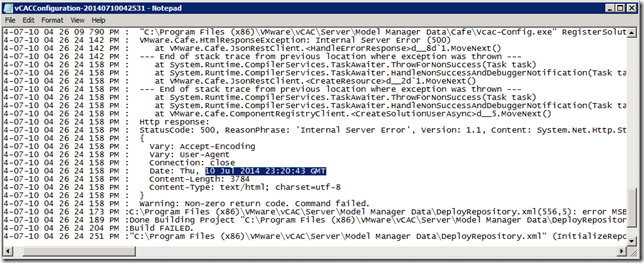
I’ve pasted it in here because I couldn’t find anything through google that referred to my error messages – hopefully if you’re reading this you’ve found it because you’re looking for it!