
VRealize Automation
 Written by Sam McGeown
on 3/2/2016
Written by Sam McGeown
on 3/2/2016Just a quick little post this morning! Anyone who works with the vRealize Automation APIs should definitely check out Grant Orchard and Roman Tarnavski’s awesome little side project,
It only took me a couple of minutes to get it running on my MacBook - here’s how!
Download and install AppCatalyst
Open a new terminal window
Create a new VM called “photon"
Written by Sam McGeown
on 10/11/2015I use mind maps quite a lot for study, I find the visual representation of info makes it a lot easier for me to remember! Below is a mind map I created for learning the roles in vRealize Automation, which I used during my presentation for #vBrownBag on VCP6-CMA objective 2.
You can download a PDF version here: vRealize Automation Roles Mind Map
Written by Sam McGeown
on 14/10/2015@vaficionado) – if that list of names doesn’t fill you with confidence for vRA.Next, then I suggest you follow them on twitter and trust me that it’s a crack team!
So, my highlights:
- Completely automated deployment…almost. The deployment of appliances and installation of IaaS components and pre-requisites will be wizard driven, the Window Servers will need to exist and have an agent installed, and the MSSQL server will also need to be installed. Anyone who’s done a distributed vRA install will know that this is a massive improvement over the current state of affairs.
- The vRealize Automation appliances will be clustered automatically for core services such as identity, cafe (portal), vPostgres and embedded vRealize Orchestrator (Embedded vRO is now recommended for production).
- A new identity service. No more vSphere SSO or PSC – VMware Identity Management (vIDM) is a new, highly scalable and performing federated identity platform. Any SAML identity source, and more than 3m users supported per source.
- An initial setup wizard that creates your first tenant, configuring things like fabric groups, business groups and vSphere endpoints automatically. It will even import your existing vSphere templates as clone blueprints.
- The old CDK is gone! Instead you can use any event within vRA that is pushed through the RabbitMQ message bus to trigger extensibility through workflow subscriptions.
- vRealize Orchestrator has a new HTML5 Control Center which is your single admin point for plugin configuration as well as adding metrics and monitoring for all workflows being executed.
- There’s no need for unique tenant URLs – the new vIDM platform allows a single logon interface for all tenants. (Though you can keep your URLs if you want!)
- vIDM can also be used to control authentication from IP source, e.g. to restrict logon to a specific subnet regardless of whether the credentials are valid or not. This has some cool ramifications for having the web layer in a DMZ, for example.
- Functionality is slowly being migrated from the old IaaS/DynamicOps layer to the appliance – this is fantastic news. The migrated portions (such as vSphere Endpoint configuration) are now accessible through the vRA API, as well as gaining the speed and stability that the appliances provide.
- The new blueprint designer is awesome. Added to that what was AppD is now called App Services and allows you to take a base blueprint (e.g. a CentOS VM) and drag and drop software components that you’ve scripted on top (e.g. Apache, then PHP). You can also drag and drop XaaS (vRO workflows) onto the blueprint, as well as existing blueprints to create nested blueprints.
- Much fuller integration between NSX and vRA. There’s a whole raft of improvements in the integration between vRA and NSX – e.g. you can drag a new routed network onto a blueprint and it will automatically create a new Logical Switch and Distributed Logical Router to attach the Logical Switch to. Similarly load balancing applications is a drag and drop operation, as is applying existing security groups.
- All blueprints can be imported and exported in YAML, which opens up exciting possibilities for storing versioned blueprints and retrieving programmatically.
- There are over 60 lifecycle events out of the box on which you can trigger Orchestrator workflows, but you can create custom filters based on properties and events to extend functionality – the only limitation is what you can imagine!
There are still several months of development to go between now and the GA of vRA 7 and the development seems to be moving at a great pace. Between beta 1 and beta 2 there was a huge amount of change, and even the version demoed today had new features and UI.
Written by Sam McGeown
on 29/9/2015 As a vExpert, I am blessed to get 1000 CPU hours access to Ravello’s awesome platform and recently I’ve been playing with the AutoLab deployments tailored for Ravello.
If you’re unfamiliar with Ravello’s offering (where have you been?!) then it’s basically a custom hypervisor (HVX) running on either AWS or Google Cloud that allows you to run nested environments on those platforms. I did say it’s awesome.
 Written by Simon Eady
on 21/9/2015
Written by Simon Eady
on 21/9/2015 Recently the team I am working with came across an interesting bug/issue with actions missing from deployed VMs. We had checked and double checked the entitlements yet the actions that should be available to the end-user/customer were not listed.
Everything appeared to point to a permissions issue until one of the team members noticed something with regards to blueprints in the catalog.
Before I continue with what we observed and how we “fixed” it please bear in mind the blueprints were created programmatically. (
Written by Sam McGeown
on 19/8/2015
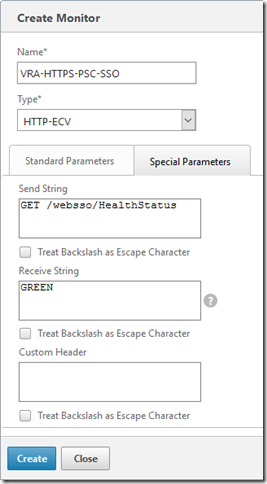
Enter a name for the monitor, and leave the other parameters the same. Select the “Special Parameters” tab and configure the send string to the URL to monitor - e.g for the PSC SSO it’s going to be:
For the receive string, enter the expected response (“GREEN”). Click Create.
Assigning a NetScaler Monitor to a Service
Assign the monitor to the PSC Services (or Service Groups) configured for PSC by opening the Configuration > Traffic Management > Load Balancing > Services page and selecting the PSC service for HTTPS/443 and clicking Edit.
Written by Sam McGeown
on 14/8/2015Now that the prerequisites for the IaaS layer have been completed, it’s time to move on to the actual installation of the IaaS components, starting with the database. We then move onto the first Web server, which also imports the ModelManagerData configuration to the database, populating the database with all of the info the IaaS layer needs out of the box. We then install the second Web server before moving on to the active Manager server. The second Manager server is passive and the service should be disabled - I’ll cover installing DEM Orchestrators, Workers and the vSphere Agents in the next article.
Written by Sam McGeown
on 14/8/2015One of the trickiest parts of deploying vRealize Automation is the IaaS layer - people sometimes look at me like I’m a crazy person when I say that, normally because they’ve deployed a PoC or small deployment with just a single IaaS server. Add in 5 more servers, some load balancers, certificates, a distributed setup and MSDTC to the mix and you have a huge potential for pain!
Written by Sam McGeown
on 24/7/2015Having just completed a particularly problem-prone distributed IaaS install, this was almost the straw that broke the camel’s back. Logging into vRealize Automation for the first time as an Infrastructure Admin displayed the infrastructure tab and all menu labels as big ugly references, and no functionality:
{com.cmware.cap.component.iaas.proxy.provider@csp.places.iaas.label }
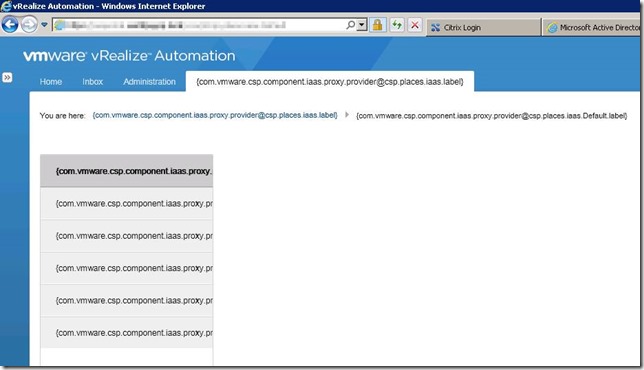
Rebooting the IaaS web servers restored the functionality of the IaaS layer but still did not fix the label issue, it took a further reboot of both vRealize Automation appliances, then the IaaS web servers to finally view the correct labels.
Written by Sam McGeown
on 8/7/2015The recommendations for the vRealize Appliance have changed with 6.2, the published reference architecture now does not recommend using an external Postgres database (either vPostgres appliance, a 3rd party Postgres deployment or using a third vRealize Appliance as a stand-alone database installation). Instead the recommended layout is shown in the diagram below. One instance of postgres on the primary node becomes an active instance, replicating to the second node which is passive. In front of these a load balancer or DNS entry points to the active node only. Fail-over is still a manual task, but it does provide better protection than a single instance.