
VRealize Automation
 Written by Sam McGeown
on 7/7/2015
Written by Sam McGeown
on 7/7/2015Providing a highly available single sign on for vRealize Automation is a fundamental part of ensuring the availability of the platform. Traditionally, (vCAC) vRA uses the Identity Appliance and relies on vSphere HA to provide the availability of the SSO platform, but in a fully distributed HA environment that’s not really good enough. It’s also possible to use the vSphere 5.5 SSO install in a HA configuration - however, many companies are making the move to the latest version of vSphere and don’t necessarily want to maintain a 5.5 HA SSO instance.
Written by Sam McGeown
on 1/4/2015 I tested vSphere 6 quite intensively when it was in beta, but I didn’t ever upgrade my lab - basically because I need a stable environment to work on and I wasn’t sure that I could maintain that with the beta.
I will be upgrading
- vCenter Server Appliance - currently 5.5 update 1
- vSphere Update Manager - currently 5.5 update 1
- 3 HP N54L resource hosts
- 1 Intel NUC management host
In my lab I run various VMware software suites listed below, although I typically run them in nested environments to keep my lab install relatively clean.
 Written by Simon Eady
on 14/1/2015
Written by Simon Eady
on 14/1/2015
Recently when do a fresh install of vRealize Automation (vRA) 6.2 I came across the following error after configuring the first end point.
Error log example

DataBaseStatsService: ignoring exception: Error executing query usp_SelectAgent Inner Exception: Error executing query usp_SelectAgentCapabilities
First of all I checked to see if the end points were working which in this case they appeared to be, but I wanted to clear the error before continuing the install.
Written by Sam McGeown
on 20/10/2014I am aware that that’s not a catchy blog post title. In fact, it doesn’t even really describe the problem or solution very well - for that I need to go into a little bit more depth!
Suppose I have configured a Reservation with two Networks ticked (“192.168.1.0-VLAN1” and “192.168.10.0-VLAN10”). As you can see in the screenshot below, each of the networks has a Network Profile created and assigned with a network pool to provide IP addressing for the VMs.
Written by Sam McGeown
on 12/9/2014SSO is a fundamental requirement when deploying vCAC, whether for a distributed or simple installation. This walk through goes through the deployment and configuration of the vCAC Identity Appliance, which provides a stand alone SSO instance for vCAC.
Some of the posts in this series are completed with vCAC 6.0.1, others will be with 6.1. Where there are differences I will aim to point them out!
Written by Sam McGeown
on 10/7/2014This was a fun little error, whilst installing the distributed IaaS roles I couldn’t seem to get the IaaS components to install – when I got the Website and Model Manager Data install it would fail with the following message:
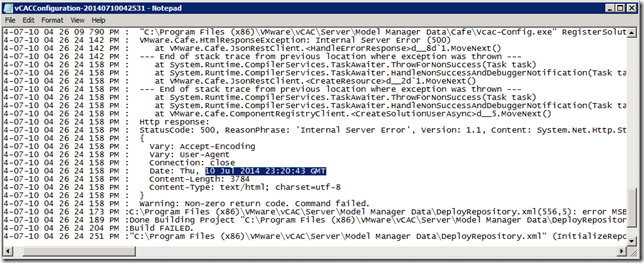
I’ve pasted it in here because I couldn’t find anything through google that referred to my error messages – hopefully if you’re reading this you’ve found it because you’re looking for it!
Written by Sam McGeown
on 25/6/2014This is the first part of the 3rd article in a series about how to build-out a simple vCAC 6 installation to a distributed model.
By the end of this part, we will not have modified the vCAC deployment in any way, we’ll just have 3 configured load balanced URLs
An overview of the steps required are below:
Written by Sam McGeown
on 24/6/2014This is the second article in a series about how to build-out a simple vCAC 6 installation to a distributed model.
The diagram below shows the deployment at the end of this part, with vPostgres deployed and the vCAC Appliance running from the remote database.
An overview of the steps required are below:
- Issue and install certificates
- Deploy an external vPostgres appliance and migrate the vCAC database
- Configure load balancing
- Deploy a second vCAC appliance and configure clustering
- Install and configure additional IaaS server
- Deploy vCenter Orchestrator Appliance cluster
Create the required DNS records
First of all, create DNS records for your vPostgres database server – you need both an A and PTR record. Most VMware appliances will check for a reverse DNS lookup when they boot and will set the hostname accordingly.
Written by Sam McGeown
on 23/6/2014This is the first article in a series about how to build-out a simple vCAC 6 installation to a distributed model.
In a simple installation you have the Identity Appliance, the vCAC appliance (which includes a vPostgres DB and vCenter Orchestrator instance) and an IaaS server. The distributed model still has a single Identity Appliance but clusters 2 or more vCAC appliances behind a load balancer, backed by a separate vPostgres database appliance. The IaaS components are installed on 2 or more IaaS Windows servers and are load balanced, backed by an external MSSQL database. Additionally, the vCenter Orchestrator appliance is used in a failover cluster, backed by the external vPostgres database appliance.
Written by Sam McGeown
on 17/1/2014So this morning I took the VMware Infrastructure as a Service exam (VCPVCD510) to gain the VCP5-Cloud qualification. The IaaS exam is available for existing VCP5-DCV holders to take without any other pre-requisites. I am very pleased to say I finished the exam in good time and scored 466/500 – the pass mark is 300.

The Exam
The exam itself is 85 multiple choice questions, and gives you 90 minutes to do them. The last two exams I’ve sat were VCAPs, which require you to move very quickly through the questions, so I am in the habit of answering quickly: I finished with over an hour to spare! The questions and answers are not particularly wordy but it is important to read carefully and pick out the important information.