
 Written by Sam McGeown
on 16/9/2015
Written by Sam McGeown
on 16/9/2015[<img class=“alignright size-medium wp-image-3968” src="/images/2014/02/pernixdata1.png" alt=“pernixdata” width=“300” height=“80” since vSphere 6 was released, simply because I can’t afford to wait on learning new versions until 3rd party software catches up. It makes you truly appreciate the awesome power of FVP, even on my less than spectacular hardware in my lab, when it’s taken away for a while.
Now that FVP 3.0 has GA’d, I’m looking forward to getting my lab storage accelerated - it makes a huge difference.
 Written by Simon Eady
on 11/9/2015
Written by Simon Eady
on 11/9/2015 I must admit I have been quite keen to get a look at vROps 6.1 so I was quick to upgrade my lab from 6.0 to 6.1 (with not problems I might add) and have a good look at the new bits and pieces.
The bits I will cover briefly in this post are..
- Upgrading from 6.0
- EPO functionality
- Dashboards
- Automated actions (ON?)
Upgrading from 6.0
Ensure you upgrade the OS of the appliance first (if you have one) - vRealize Operations Manager - Virtual Appliance Operating System upgrade (vRealize_Operations_Manager-VA-OS-6.1.0.3038037.pak )
Written by Simon Eady
on 10/9/2015So vROps 6.1 has gone GA!
What have the guys at VMware added? I have listed what I consider the hi-lights below
The maximum of 8 nodes has been doubled to 16!
SSO integration has been added (requires vSphere 6.0)
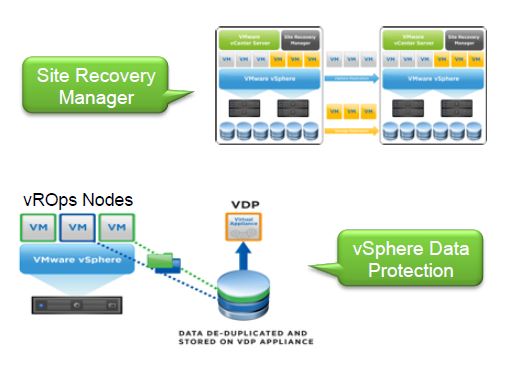
**Support for SRM has been added
 **
**
vRealize Hyperic functionality has been added
With the addition of End Point Operations Management, the value of vRealize Hyperic functionality has been extended to the vRealize Operations Manager core product, without the need to deploy vRealize Hyperic
Written by Sam McGeown
on 3/9/2015 With a Platform Services Controller appliance deployed as part of a vCenter Server installation, either integrated as part of the vCSA or as a separate PSC appliance, you can easily join the PSC to an Active Directory domain using the Web Client.
When you’ve deployed the PSC as the single sign on layer of a distributed vRealize Automation deployment, you don’t have the vSphere Web Client to configure it in the same way. This means that you can’t add an integrated Active Directory identity source to the default tenant, either using the PSC machine account or an SPN for Kerberos.
Written by Simon Eady
on 27/8/2015One of the great new features included in vROps is High Availability, however when you look a little closer at how it works careful thought needs to go into whether you want to use it or not.
I have had several discussions with my colleagues on the subject about whether you should or should not enable it in any given deployment of a vROps cluster.
So the following are my thoughts and bullet points for you to consider when faced with same dilemma.
Written by Sam McGeown
on 19/8/2015
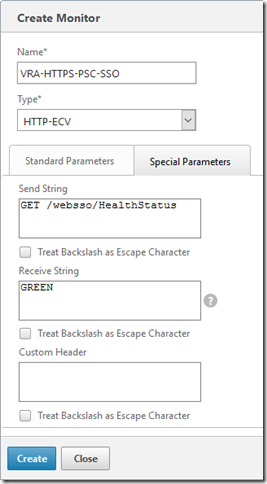
Enter a name for the monitor, and leave the other parameters the same. Select the “Special Parameters” tab and configure the send string to the URL to monitor - e.g for the PSC SSO it’s going to be:
For the receive string, enter the expected response (“GREEN”). Click Create.
Assigning a NetScaler Monitor to a Service
Assign the monitor to the PSC Services (or Service Groups) configured for PSC by opening the Configuration > Traffic Management > Load Balancing > Services page and selecting the PSC service for HTTPS/443 and clicking Edit.
Written by Simon Eady
on 17/8/2015 Recently I have been working with various products that compliment or are accessed by vCOPs/vROps via Management packs.
As vROps is still fairly new in comparative terms to other products like vCOPs and VCE Vision, when planning migrations from vCOPs to vROps it is naturally important to check compatibility and what is required for a successful migration.
If you are doing a greenfield deployment of vROps there is nothing to be concerned about, you simply need the VCE Vision appliance running version 2.6.1-2.6.5 and have the latest Management Pack installed on your vROps cluster.
Written by Sam McGeown
on 14/8/2015Now that the prerequisites for the IaaS layer have been completed, it’s time to move on to the actual installation of the IaaS components, starting with the database. We then move onto the first Web server, which also imports the ModelManagerData configuration to the database, populating the database with all of the info the IaaS layer needs out of the box. We then install the second Web server before moving on to the active Manager server. The second Manager server is passive and the service should be disabled - I’ll cover installing DEM Orchestrators, Workers and the vSphere Agents in the next article.
Written by Sam McGeown
on 14/8/2015One of the trickiest parts of deploying vRealize Automation is the IaaS layer - people sometimes look at me like I’m a crazy person when I say that, normally because they’ve deployed a PoC or small deployment with just a single IaaS server. Add in 5 more servers, some load balancers, certificates, a distributed setup and MSDTC to the mix and you have a huge potential for pain!
Written by Simon Eady
on 7/8/2015 A few months ago I decided to tackle the VCAP5-DCD exam and when booking I gave myself 2 months to study before the date of the exam.
I was keenly aware that at least in this calendar year the VCAP5-DCD exam and undergone some changes E.G. it no longer had multiple choice questions (think VCP5-DCV in terms of format)
There was a wealth of knowledge out there from people whom had either passed/failed or were currently studying so it didn’t take too long to get an understanding of what disciplines/knowledge VMware were looking for in the exam.