Written by Simon Eady on 30/8/2014
Published under

So recently I came across an error in the vSphere windows “fat client” when trying to use the search field.


So a quick look at the VMware knowledge base brought up the following article

http://kb.vmware.com/selfservice/microsites/search.do?language=en_US&cmd=displayKC&externalId=2063020

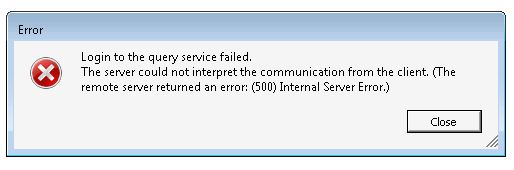
So I went ahead and followed the KB artricle and then tried to search again.. the following error was generated.

Written by Sam McGeown on 23/7/2014
Published under VMware

Quick post to cover a fix for installing the VNXe SRA when you encounter the below error:

Failed to load SRA from ‘C:/Program Files/VMware/VMware vCenter Site Recovery Manager/storage/sra/EMC VNXe SRA’. SRA command ‘queryInfo’ didn’t return a response.

The components installed (in this order) are:

  1. vSphere 5.5
  2. SRM 5.5
  3. UNISphere CLI 1.5.4.1.0027-1
  4. VNXe SRA 5.0.0

The root cause is that the system locale is EN-GB rather than EN-US, however even changing the locale does not resolve the issue. The Java installation will still try and load an en_GB module and fail. The solution is as follows:

Written by Sam McGeown on 23/7/2014
Published under VMware, vRealize Orchestrator

As a PowerShell fan I find using the vCO PowerShell plugin makes my life a whole lot easier. What isn’t easy however, is  the configuration of vCO and a PowerShell jump host. Having done it a few times, this is my method for ensuring a secure working connection using HTTPS and Kerberos.

Configure the Orchestrator Appliance

Since we’re planning on using Kerberos authentication, we’d better ensure that the time is correct AND syncs to the same source as the domain.

Written by Sam McGeown on 10/7/2014
Published under VMware, vRealize Automation

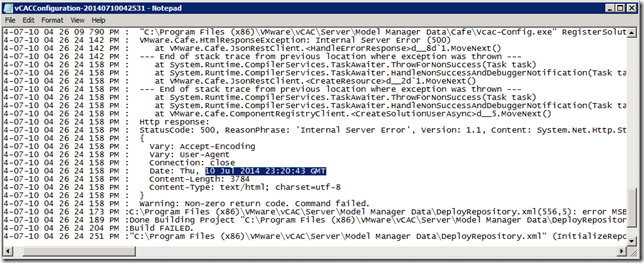
This was a fun little error, whilst installing the distributed IaaS roles I couldn’t seem to get the IaaS components to install – when I got the Website and Model Manager Data install it would fail with the following message:

I’ve pasted it in here because I couldn’t find anything through google that referred to my error messages – hopefully if you’re reading this you’ve found it because you’re looking for it!

Written by Sam McGeown on 1/7/2014

Recently I encountered this problem in a customer site whereby the logon to VCSA 5.5 would either time out, or take 3-5 minutes to actually log on.

Running a netstat on the VCSA during the attempt to logon showed there was a SYN packet sent to the vCOps appliance on port 443 that never established a connection. Another check was attempting to connect using curl <https://> –k  - this would time out.

Written by Sam McGeown on 26/6/2014
Published under VMware

This is the fourth article in a series about how to build-out a simple vCAC 6 installation to a distributed model.

By the end of this post we will have deployed a second vCAC Appliance, clustered it with the first appliance and registered the load balanced URL with the Identity Appliance. This will mean logging on to https://vcloud.definit.local/shell-ui-app will be successful.

An overview of the steps required are below:

Written by Sam McGeown on 25/6/2014
Published under VMware

This is the second part of the 3rd article in a series about how to build-out a simple vCAC 6 installation to a distributed model.

By the end of this part, we will not have modified the vCAC deployment in any way, we’ll just have 3 configured load balanced URLs

An overview of the steps required are below:

Written by Sam McGeown on 25/6/2014
Published under VMware, vRealize Automation

This is the first part of the 3rd article in a series about how to build-out a simple vCAC 6 installation to a distributed model.

By the end of this part, we will not have modified the vCAC deployment in any way, we’ll just have 3 configured load balanced URLs

An overview of the steps required are below:

Written by Sam McGeown on 24/6/2014
Published under VMware, vRealize Automation

This is the second article in a series about how to build-out a simple vCAC 6 installation to a distributed model.

The diagram below shows the deployment at the end of this part, with vPostgres deployed and the vCAC Appliance running from the remote database.

An overview of the steps required are below:

  • Issue and install certificates
  • Deploy an external vPostgres appliance and migrate the vCAC database
  • Configure load balancing
  • Deploy a second vCAC appliance and configure clustering
  • Install and configure additional IaaS server
  • Deploy vCenter Orchestrator Appliance cluster

Create the required DNS records

First of all, create DNS records for your vPostgres database server – you need both an A and PTR record. Most VMware appliances will check for a reverse DNS lookup when they boot and will set the hostname accordingly.


Written by Simon Eady on 23/6/2014
Published under

Fairly recently i attended the annual VMware vForum London 2014 at Wembley stadium!

If you have never been to a vForum i would certainly recommend it as it offers the chance to not only attend excellent and pertinent sessions but there is also the opportunity to network and visit the large vendor hall which as ever was a busy place!


Keynote and sessions

The opening keynote by @joebaguley  (Joe Baguley) was excellent and as challenging as ever one aspect that stood out to me personally was the question “where are you on your journey?” (see pic/slide below)