
 Written by Simon Eady
on 20/12/2012
Written by Simon Eady
on 20/12/2012 This year for me personally has been extremely busy and eventful coupled with a great deal of learning.
Without wishing to bore the pants off of any would be reader I shall summarize my ruminations as someone whom is still quite new to the VMware world.
The first thing that comes to mind is a a couple of recent meetings I have had with VMware. Learning that they are now very keen to engage with ’the rest of us’ and by that I mean those of us working in SME’s as we represent well over 50% of their business revenue. For me personally this was excellent news as we have already invested heavily into the VMware product range and plan to carry on doing so in the future. The recent release of VMware suites was a good step forward but I still feel they need to do a lot better in communicating to SME’s about their vast (and ever increasing) product range as there are many gems that can often go unoticed. Our discovery of vCops earlier this year was a good example of this.
 Written by Sam McGeown
on 24/11/2012
Written by Sam McGeown
on 24/11/2012While adding an additional vCenter Server to our Multi-Site Single Sign On instance I encountered a problem as I entered the details of the existing SSO.

The error thrown was:
User credentials are incorrect or empty. Provide correct credentials.
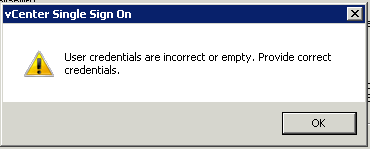
After a couple of hours online with VMware support I took a guess at the problem. On the existing Single Sign On Configuration I have added the Active Directory domain DefinIT and in order to enable integrated authentication from the vSphere Client I moved it to the top of the list - this meant that System-Domain is no longer the default authentication domain. The SSO admin account (admin@System-Domain) is a part of that domain and so my guess is that the installer tries to authenticate using [email protected] rather than System-Domain, which of course failed.
Written by Sam McGeown
on 22/11/2012 I’ve been learning my vSphere 5 config maximums before my upcoming VCP5 exam, so in a supreme effort of procrastination I thought I’d write a PowerShell quiz script: here it is!
Save the QuizMe.ps1 file into a folder and then place one or more text file in the same folder containing a comma delimited set of questions and answers. Then run QuizMe.ps1!
You can choose the quiz you take (which text file it will use).
Written by Sam McGeown
on 6/11/2012The process of requesting certificates for vSphere 5.1 is a fairly grim, manual process. It’s repetitive and easy to make a mistake on any step of the way. Since I’ve got to do this for quite a few VirtualCenter Servers, I thought I’d script the certificate generation if nothing else. I am following the excellent documentation provided in Implementing CA signed SSL certificates with vSphere 5.1 and more specifically in Creating certificate requests and certificates for vCenter Server 5.1 components.
Written by Sam McGeown
on 28/10/2012 VMware vSphere Single Sign On (SSO) can be installed in Multi-site mode to support local sign-on to vCenters that you want to be part of the same single sign on domain - for example, if you want to install Linked-Mode and have the advantage of a single pane of glass view, but can’t risk using a single SSO instance across the WAN. In other words, from
Written by Sam McGeown
on 17/10/2012I ran into this issue yesterday while reconnecting hosts in our vCenter Server following a complete reinstall - the reasons for which are a long story, but suffice to say that there were new certificates and the host passwords were encrypted with the old ones.
The LUNs had been unpresented at the hardware level by the storage team, but had not been unmounted or removed from vCenter. This is not the way to remove storage - let me re-iterate:
Written by Simon Eady
on 5/10/2012So recently we upgraded our cluster monitoring suite to it’s latest iteration (Veeam ONE), it was not long before I began to receive emails from the monitor informing me of Host disk write latency “errors” (Datastore write latency had exceeded the defined threshold in the monitor) on several of the Datastores on our SAN.
Naturally I began the process of cross referencing backup routines and any heavy I/O routines that may have been running at the time the warning messages were generated. My conclusion was that even under average load these alerts were being generated, which was far from ideal even if we had not noticed any performance problems with any of the busy VMs.
Written by Sam McGeown
on 4/10/2012One thing we have been meaning to do for a while but haven’t got round to is getting our Virtual Center Servers into “Linked” mode - essentially to provide a single pane of glass view of our entire virtual estate. One vCenter resides on the other side of our DMZ and manages hosts isolated for security purposes. I’ve created an IPSec server-to-server connection and allowed that through the firewall to secure traffic between the DMZ VC and LAN VC.
Written by Sam McGeown
on 25/9/2012In vSphere 5.1 “Tags” replace the old custom attributes to provide a way of adding metadata to vSphere objects. The “Tags” are organised into categories to “define how the tags can be applied to inventory objects”. The easiest way to think of the difference is that custom attributes are “free text” and the tags are statically defined properties.
There is a wizard for converting custom attributes to tags, but it can get a bit confusing and is pretty poor - let me explain. We use four custom attributes in my current environment: CreatedBy, CreatedOn, Owner and ServiceType. CreatedBy contains the user ID of the person who created the VM, CreatedOn is the timestamp of when the VM was created, Owner is the Business Unit who own the server and ServiceType is the type of service - e.g. Active Directory, or SQL.
Written by Simon Eady
on 29/8/2012Firewalls being used – Sonicwall 3500 & Cisco 506e
Several months ago we relocated and it was then necessary to setup a Site to Site VPN tunnel with another network. (In this instance the other network was not directly managed by us)
Upon the creation of the tunnel and after successful traffic tests all looked well. However after several hours or less in some cases traffic stopped flowing yet both firewalls reported the tunnel as “up”. We reviewed the first and second phase settings and tweaked the Sonicwall VPN settings to hopefully remedy.