
 Written by Sam McGeown
on 22/3/2011
Written by Sam McGeown
on 22/3/2011
Having recently managed several Exchange 2010 migration projects, one of the best new features which really sells it to systems administrators is the Online Archive. “No more managing PST files? When can we have it installed by?”
The problem is, once they’ve purchased licensing for Exchange 2010 and installed and configured the server, migrated the users’ mailboxes and decommissioned the old Exchange 2003 server, the Online Archive feature is not available. The users have been enabled, and as of SP1 we have a separate Archive mailbox database configured on slow (cheap) storage, but the Online Archive is nowhere to be found in Outlook. If the users log on using OWA, lo and behold the Online Archive is available.
Written by Sam McGeown
on 21/3/2011
While using the New-TestCasConnectivityUser.ps1 script to create a test user for Exchange 2010’s connectivity testing, I ran into an issue:
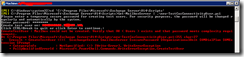
Oddly enough, that OU does exist (as it will by default on any Windows Domain!) and the password complexity more than satisfied the complexity requirements. The issue is simple enough to fix, I opened the script in notepad and found the line beginning “new-mailbox” – and deleted the parameter “–OrgainisationalUnit:$OrganistationalUnit”. This means the new user defaults to the default OU – Users!
Written by Sam McGeown
on 10/3/2011 Disclaimer: this post is more for my own recollection than anything else! When it comes to Linux, I’m an amateur and everything I do from the simplest thing upwards is copy-and-paste from much more informed bloggers and websites!
My home server is running Ubuntu Linux 10.10 – access is via an SSH client only. I run an NFS file server for my home network, which stores my Music and Video for the network, and is running an iTunes server. Most of my DVDs have been ripped to high quality MP4 files for viewing on PC, but they aren’t suitable for my iPhone, so I also frequently compress them for viewing on that device.
Written by Sam McGeown
on 3/3/2011Recently I installed and configured a client’s new ESXi host, they’re a small company and only require a single host. The host in question was an IBM x3650 M3, an excellent workhorse for virtualisation and one of 5 or 6 of the same model that I’ve installed in the last year. In addition to the onboard Broadcom Dual Gigabit NIC, we always install at least a second Intel PCIx Dual Gigabit card for resilience/redundancy/performance.
 Written by Simon Eady
on 3/3/2011
Written by Simon Eady
on 3/3/2011So here  we go, my very first tech blog… so what on earth do I start with?
Given I am unlikely to have any profound revelations I shall simply focus on what I have discovered as useful and helpful on my travels!
First up then…
I have been asked on many occasions by individuals and SMEs should they opt for a brand such as HP over Dell or vice versa… as ever my default response is a brief needs analysis. It seems all to often folk get caught up by hearsay/brand loyalty over suitability.
Written by Sam McGeown
on 23/2/2011 If you’ve been here before, you may have noticed a couple of changes – the theme and name of this blog for example, and hopefully you’ve been redirected to a new URL! There are a couple of reasons for the changes, all of which are aimed at increasing the presence and visitor numbers on this site:
- Branding. Whether I like it or not, “McGeown” is not easy to spell or remember so I wanted to move away from it as an identity. After some discussion with my friend and creative advisor Matt Hellyer, I picked DefinIT.
- I’d like to add some more bloggers to the site – the number of visitors is directly in proportion to the number of posts, and I can’t post as much as I’d like to. I will introduce those bloggers as and when they arrive, but they will be people I know and trust – with real technical expertise. (That said, if you’re reading and are interested in writing for DefinIT, please contact me!)
- Eventually I’d like to use McGeown.co.uk for a more personal site, aimed at family and friends. That’s what it was originally aimed at, and hopefully one of these days I’ll get the time.
Feel free to let me know what you think about the new theme, new name and new URL in the comments below. This blog will always be dedicated to providing high quality IT help on a broad range of subjects, as ever, I hope it helps!
Written by Sam McGeown
on 8/2/2011Recently I needed to report on the ActiveSync devices that were attached to our Exchange 2010 organisation, and which users they were accessing, and then export them to a CSV file.
This is the script:
Walking through the script it gets all the mailboxes from the server MBX01, gets an object containing the ActiveSync device name, type and user agent. It then adds a property to that object called “MailboxIdentity” and adds it to that object. That object is then added to an array of objects called ActiveSyncDevices, which is then exported to CSV.
Written by Sam McGeown
on 4/2/2011I can’t plead ignorance: I should know better!
For years I have preached to users about the importance of strong passwords, regular password changes and non-proliferation of the same password, yet I’ve fallen foul of 2 of my own rules. My password is strong - 13 characters, random alpha-numeric, upper and lower case and including special characters - but has been re-used in a few places, and hasn’t been changed in a (long) while.
Written by Sam McGeown
on 6/1/2011 Getting a SCOM 2007 R2 SCOM agent on TMG is a useful way of monitoring TMG, especially with the SCOM TMG Management Pack – it’s not exactly “out-of-the-box” functionality though, with many sources I’ve read simply stating that it can’t be done. There are some half-working solutions I’ve seen, but nothing that worked for me.
The process involves simply opening the correct ports and protocols between the TMG servers and the SCOM management servers, which after a few attempts watching the live logs, I found.