Written by Sam McGeown on 13/8/2010
Published under Microsoft

The NT Testing TCP Tool is a handy little tool for testing the throughput between two servers – and it’s free! It’s available to download here: http://www.microsoft.com/whdc/device/network/TCP_tool.mspx

First, you need to install the MSI on both ends – for the sake of this, say SERVER1 and SERVER2. Once you’ve installed it on the server, navigate to \Program Files\Microsoft Corporation\NT Testing TCP Tool, you should see a few copies of the tool for different architectures. Locate the correct .exe for you architecture and rename it to ntttcps.exe. Copy this and rename it to ntttcpr.exe – these form the sender and receiver parts of the tool.

Written by Sam McGeown on 10/8/2010
Published under Microsoft

I am mid-migration, in a co-existence setup with Exchange 2010, 2007 and 2003. So far the roles installed for Exchange 2010 are CAS, Hub and Mailbox on a single server. Into this mix I need to introduce an Edge Server, with message hygiene in the form of Forefront Protection for Exchange (FPE) and Threat Management Gateway (TMG) as a reverse proxy to publish OWA, ActiveSync et-al.

Written by Sam McGeown on 10/8/2010
Published under Microsoft

If you’re having trouble accessing OWA after updating Exchange 2010 with any of the Rollup packages, try this:

  • Uninstall the update package from the Programs and Features control panel

  • Download the package file directly from Microsoft, don’t use Windows Update

  • Open a command prompt or PowerShell prompt as Administrator

  • Navigate to the location of the package (.msp) and run from the elevated command prompt.

Apparently when Windows update installs the package it doesn’t run it with the elevated privileges to write to the folder in the Exchange program files – why, I have no idea!

Written by Sam McGeown on 29/7/2010
Published under Microsoft

On Monday I took the two Exchange 2010 exams, “70-662 TS: Microsoft Exchange Server 2010, Configuring” and “70-663 PRO: Deploying Messaging Solutions with Microsoft Exchange Server 2010” and I am pleased to say that I passed both of them, scoring an 812 on the 70-662 and 960 on the 70-663. I am especially pleased with the score on the PRO exam!

Overall, there’s quite a lot of overlap between the two exams, with the more heavily theory and design based PRO exam being a “high-level” of the more hands-on management and cmdlet based TS exam.

Written by Sam McGeown on 21/7/2010
Published under

Up until now, I’ve been using BlogEngine.Net as my blogging platform, and up until now I’ve been relatively happy with using it. One of the major drivers for me as a “Microsoft” person was to use something that is based on Microsoft technology – BlogEngine.Net is based (as the name suggests) on the .Net framework. I’m much happier these days writing limited amounts of C#.Net than I am with PHP.

Written by Sam McGeown on 21/7/2010
Published under

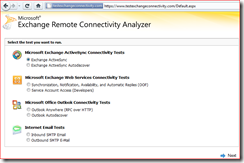
The Microsoft Exchange Remote Connectivity Analyzer is perhaps the best tool I’ve used in a long time for troubleshooting Exchange external access – it just works! On the forums and websites I read, it doesn’t seem to get the coverage that I’d expect, so I thought I’d give it a mention.

Written by Sam McGeown on 8/7/2010
Published under

I’ve just fixed an issue with Routing for my mixed Exchange 2003/2007/2010 environment.

The environment is a single AD domain with 4 sites, Site1, Site2, Site3 and Site4. In Site1, Site2 and Site3 there are 3 Exchange 2003 servers, one per site. In Site4 there is an Exchange 2007 SP2 server (CAS, Mailbox, HT). All the connectors required worked as expected, and inter-site routing works as expected.

I introduced into the mix a 2010 Enterprise server (CAS, Mailbox, HT) to Site1 as a prelude to a full upgrade of the site to Exchange 2010. When a test mailbox from Exchange 2010 attempts to send to a mailbox in Site1 Exchange 2003, it routes via the Site4 Exchange 2007.


Written by Sam McGeown on 2/7/2010
Published under

I’ve spent a fair bit of time today trying to sort out my iPhone sync to my Exchange Server, failing miserably. It used to work, pre-upgrade to iOS4, but for some reason fails to sync.

Symptoms were:


The server was configured as per http://support.microsoft.com/kb/817379/en-us to allow OWA/ActiveSync with SSL on OWA.

Written by Sam McGeown on 25/6/2010
Published under Microsoft

This is a pretty specific set of instructions for a specific environment:

  • If

  • you are using Microsoft System Center Operations Manager 2007

  • and

  • you have a Microsoft Certificate Services 2003 Certificate Authority on your domain

  • and

  • you have non-domain Windows Server 2008 servers you wish to monitor or set up as a gateway server.


Getting a certificate for either a Gateway Server or remotely monitored Server can be a touch vexing. If you’re installing on the same domain as the SCOM management server the security settings take care of themselves, not so for non-domain servers, which require mutual certificate authentication. The Gateway must trust the Domain CA and identify itself as trusted to the Management Server. I have bashed my head against this several times now, so I thought I’d make a precise blog post to cover the steps required!

Written by Sam McGeown on 17/6/2010
Published under Microsoft

I’m currently testing an Exchange 2010 server for the organisation prior to a migration project, specifically testing moving mailboxes backwards and forwards. Something that confused me slightly for a few minutes was this: if there is an existing Move Request (pending, in progress, failed or completed) you will not see the “New Local Move Request” or “New Remote Move Request” -

Fortunately this is very simple to counter – simply clear the old “Move Request” and the options will be back in the Mailbox options: