Written by Sam McGeown
on 6/11/2013In my post yesterday (vexpert.me/hS) I talked about how to recover from an expired default SSO administrator password – this prompted a discussion on twitter with Anthony Spiteri (@anthonyspiteri) and Grant Orchard (@grantorchard) about the defaults for expiration and how to mitigate the risk.
The first solution is to modify the password expiration policy for SSO. I’m not advocating this necessarily – I think that expiring passwords ensure that you change them regularly and increase the overall security of your SSO solution. However, I can envisage situations (similar to mine) when the SSO administrator account is not used for a long time and expired – that causes headaches.

Written by Sam McGeown
on 26/9/2013This is the first article in a series of vSphere Security articles that I have planned. The majority of this article is based on vSphere/ESXi 5.1, though I will include any 5.5 information that I find relevant.
I think lockdown mode is a feature that is rarely understood, and even more rarely used. Researching this article I’ve already encountered several different definitions that weren’t quite right. As far as I can see there are no differences between lockdown more in 5.5 and 5.1.
Written by Sam McGeown
on 11/6/2013The vSphere UMDS provides a way to download patches for VMware servers that have an air-gap, or for some reason aren’t allowed to go out to the internet themselves – in my case a security policy prevented a DMZ vCenter Server from connecting to the internet directly. The solution is to use UMDS to download the updates to a 2nd server that was hosted in the DMZ and then update the vCenter Server from there. It also can save on bandwidth if you’re running multiple vCenter Servers, which again was the case (though bandwidth isn’t really a constraint).
Written by Sam McGeown
on 24/11/2012
While adding an additional vCenter Server to our Multi-Site Single Sign On instance I encountered a problem as I entered the details of the existing SSO.
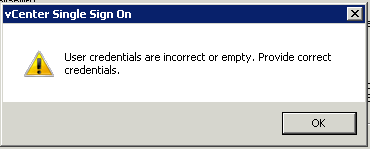
The error thrown was:
User credentials are incorrect or empty. Provide correct credentials.

After a couple of hours online with VMware support I took a guess at the problem. On the existing Single Sign On Configuration I have added the Active Directory domain DefinIT and in order to enable integrated authentication from the vSphere Client I moved it to the top of the list - this meant that System-Domain is no longer the default authentication domain. The SSO admin account (admin@System-Domain) is a part of that domain and so my guess is that the installer tries to authenticate using [email protected] rather than System-Domain, which of course failed.
Written by Sam McGeown
on 6/11/2012
The process of requesting certificates for vSphere 5.1 is a fairly grim, manual process. It’s repetitive and easy to make a mistake on any step of the way. Since I’ve got to do this for quite a few VirtualCenter Servers, I thought I’d script the certificate generation if nothing else. I am following the excellent documentation provided in Implementing CA signed SSL certificates with vSphere 5.1 and more specifically in Creating certificate requests and certificates for vCenter Server 5.1 components.
Written by Sam McGeown
on 28/10/2012
VMware vSphere Single Sign On (SSO) can be installed in Multi-site mode to support local sign-on to vCenters that you want to be part of the same single sign on domain - for example, if you want to install Linked-Mode and have the advantage of a single pane of glass view, but can’t risk using a single SSO instance across the WAN. In other words, from